A guide to your canvas creator
Canvas print
builder.
See before you buy.
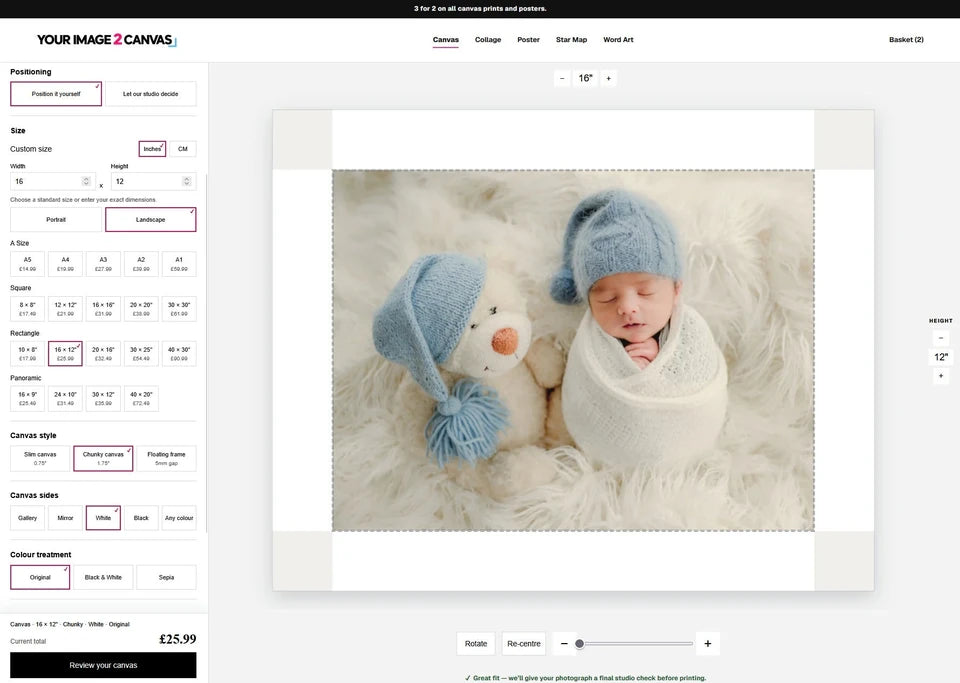
Use our canvas print builder to preview your photograph before you buy. Choose the size, crop and finish, then review your choices before ordering. We check the image and prepare it for print in our workshop.
Want us to position the photo? Choose “Let our studio decide”.
Make your canvas
in three steps.
You can use a photo from your phone or camera. Start with the original file, then choose the size and finish.
Upload your photograph.
Use the original file from your phone or camera where possible. Choose Email if you would rather send it separately, or send us a full-resolution download link.
Choose the size and finish.
Pick a standard size or enter your own dimensions. Still deciding? Compare the size and get a price first, then return with your measurements already chosen.
Check before adding to your basket.
Check the crop, the important details and your complete price. Review your choices before adding the print to your basket.
Before you upload.
A phone photograph can make a lovely canvas. Use the original file so we have as much detail as possible.
Use the original photo.
Upload from your camera roll or the original file your photographer supplied. Saving a picture from social media or taking a screenshot can reduce the detail. If someone sent it to you, ask for the original or a full-resolution download link.
Phone or computer?
You can order on your phone. We recommend a laptop or desktop if you want more room to adjust the crop and compare options. On either, you can choose “Let our studio decide” and leave the positioning to us.
Tell us what to keep.
Add a note if you want us to keep a particular detail in the picture — everyone’s face, the dog’s ears, the whole dress or a signature. We read these notes when preparing the print.
Not sure which size suits your photograph? Send us the image and the size you have in mind. We can look at the actual file and help you decide.
Same photograph.
A different crop.
A square and a rectangle show different parts of your photo. Try changing the shape below, then zoom or move the picture to see what stays in view.
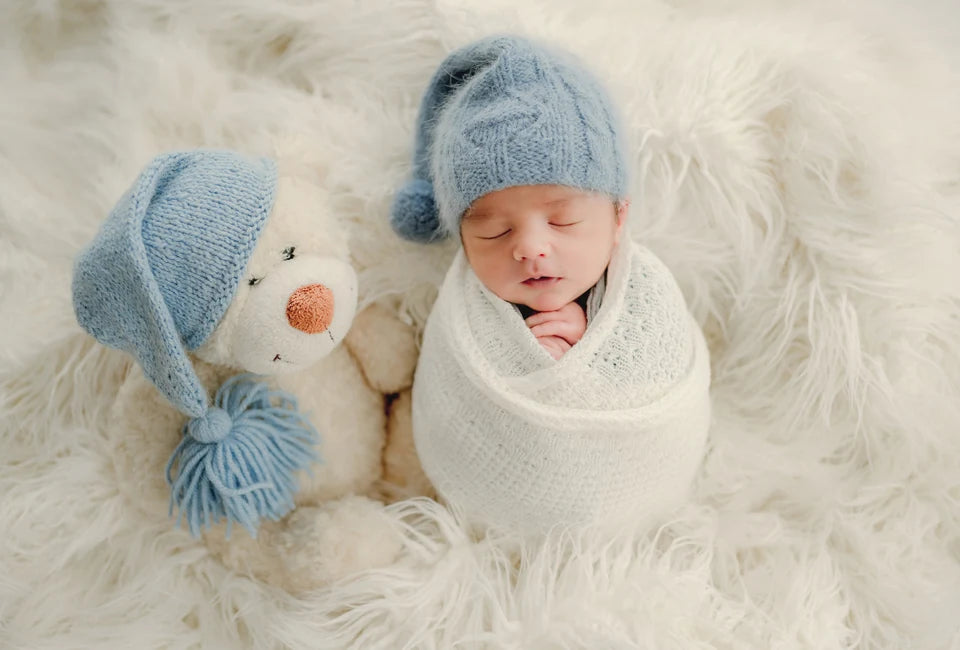
Zooming in makes the subject larger, but leaves more of the image outside the crop. Look around heads, hands, paws and lettering. Keep the details that matter comfortably on the front.
The original photograph.
The printed shape may need a different composition.
This example demonstrates cropping. Use your own image in the live builder to check the actual print preview.
Close-up photographs of our canvas sides and folded corners.
Canvas sides, explained
What goes around
the sides?
The canvas wraps around a wooden frame. Choose what appears on those sides and check how it affects the front of your photograph.
The photograph continues around the sides. Look carefully at anything near the border. If there is not enough image for every side, we may be able to prepare extra background for the canvas wrap.
The image edges are reflected onto the sides. This can help keep details on the front, although the front can still need cropping to fit its shape.
Choose White, Black or Any colour to print a solid colour on the sides. The front still needs to fit your chosen canvas shape.
The depth of your canvas
How deep is
the canvas?
Slim is about 19 mm deep; Chunky is about 44 mm. Both use the same canvas and printing process, and both cost the same for your chosen size.
A floating frame adds an outer frame around the canvas, with a small gap. The creator shows the available finishes and additional price for your chosen size.
Explore floating framesSolid pine frames made in our workshop.
The builder is the start.
Then we get to work.
You choose the photograph, size and finish. We look at the actual file and prepare it for the canvas. There’s a person behind your order, checking the details before it reaches the printer.
A real person looks at the photograph and the finished print.
- 01
We read your order.
The size, crop, depth, side treatment and any notes you’ve left. If you’ve asked us to keep the dog’s ears or the whole wedding dress, that matters to us too.
- 02
We check how the photo fits.
We look at the balance of the picture and what is happening around the edges. We don’t want an important part of the photograph disappearing round the side of the canvas.
- 03
We prepare the image for print.
Where it needs it, we prepare the image individually. That can mean improving clarity, tidying a small distraction or preparing extra background for the wrap. We work with your chosen colour treatment and the notes you’ve given us.
- 04
We check what we’ve made.
The printed image, the stretch, the sides and the corners all get a look before packing. We want you to be pleased when you open the box—and just as pleased with the next one.
Want Gallery wrap,
but short of image?
Sometimes there’s enough photograph to cover two sides, or three, but not all four. You don’t necessarily have to give up the finish you wanted.
Where the photograph allows it, we can prepare extra background so it carries around the remaining sides. The aim is to keep the important parts of your photograph on the front and give the wrap a natural finish.
It depends on the image. A simple background gives us more to work with than a face or lettering right at the edge. If it needs a different approach, we’ll talk it through with you.
Choose Gallery wrap and add a note about the detail you want to keep. If you can’t get the preview right, choose “Let our studio decide” or email the original photo with your order number.
Front of your canvasThe shaded right and bottom areas show where the background would need extending.
This is a diagram of the front and sides, not a retouched photograph or a production template. Your image is prepared individually.
Colour illustration: Original. The live creator provides your ordering preview.
Colour treatment
Colour, black and white
or sepia?
Try each option to see which suits your photograph. Choose Original to keep the image’s existing colours.
Keeps the original colour treatment of your photograph.
Turns your photograph black and white.
A warmer, brown-toned look.
Leave this on Original if you have already edited the colours or converted the photo to black and white.
Want us to
position the photo?
Choose “Let our studio decide”, then add a note if there is anything you want us to keep in the picture: the dog’s ears, the whole dress or a signature near the edge.
For an emailed proof before printing, use Express Canvas. Choose the size and finish, upload your photo and place your order. We prepare the crop and email it for your approval.
One last look
Check your order.
Before adding the print to your basket, check these details:
- Width, height, units and orientation.
- The crop, including details near the edges.
- Canvas depth and side treatment.
- Original colour, Black & White or Sepia.
- Any floating frame, hanging kit or studio note.
- The complete price and physical print quantity.
For 3 for 2, choose all three qualifying prints you want to receive. The lowest-priced qualifying base print is free; frames and extras are charged separately.
Our team at the canvas framing bench in the YI2C workshop.
Canvas builder questions.
If you are unsure about your photo, email it to us with the size you want.
How do I get the 3-for-2 offer?
Add all three qualifying prints you want to receive to your basket. The lowest-priced qualifying base print is free. Frames, hanging kits and other extras are charged separately.
Can I use a photograph from my phone?
Yes. Use the highest-quality original you have. The size you choose affects how much detail it can reproduce; send us the file if you are unsure.
Do you check my photograph after I order?
Yes. We check the actual image, your crop, the size and side treatment, and any notes you have left. Where the file needs preparation, we work on it before printing. The finished canvas is checked again before packing.
Can I have Gallery wrap if the photo is tight at the edges?
Often we can help. If there is enough image for two or three sides, we can use Photoshop to extend suitable background for the remaining sides. It depends on the photograph. Tell us which details must stay on the front and we will look at the best way to prepare it.
Will Photoshop preparation appear in my builder preview?
The builder shows the photograph you uploaded and the choices you make there. Studio work happens after we receive the order, so extra background prepared by us will not already appear in that preview. Leave a note or choose Let our studio decide if you need our help.
Will Mirror sides remove the need to crop?
Mirror provides reflected content for the sides. The front can still need cropping to match a square, rectangle or panorama. Always check the front preview.
Can I enter a custom size?
Yes. Our size and price calculator accepts inches, centimetres or millimetres and carries the dimensions into the builder. Contact us first for a critical fit.
What if my file is too large to upload?
Choose Email in the creator and send the file or a full-resolution download link separately, with your order details.
Can I order from my phone?
Yes. A larger screen can make it easier to inspect a detailed crop. You can also let our studio position the image, or use Express Canvas for a proof before printing.
Ready to create your canvas?
Upload your photo and choose your size. We print, stretch and finish your canvas in our West Yorkshire workshop.