Choose your original
Use your own clear photograph, not the example artwork on this page. For the shared portrait, choose a separate photograph of each pet.
Made in West Yorkshire since 2007 · Free UK next-working-day delivery*
 Buy 2, get 1 free.
AI PET PORTRAIT IDEAS
Your pet. A little imagination. Something worth printing.
Turn a favourite pet photograph into a quiet studio portrait, a soft watercolour or a traditional oil painting. Explore five approaches, personalise the prompt for your own pet and compare the result with your original before printing.
Explore the ideas Already have your artwork? Print it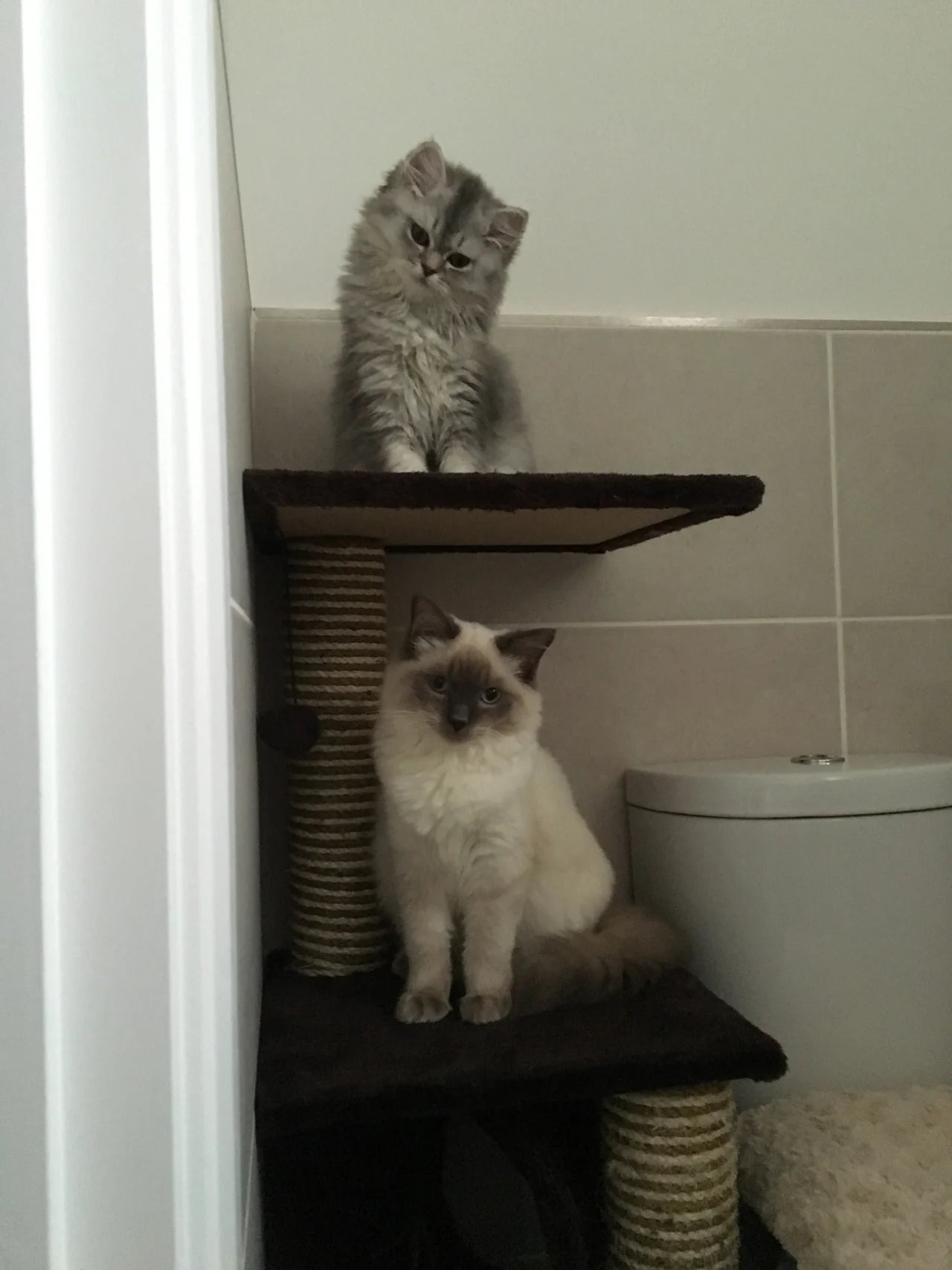
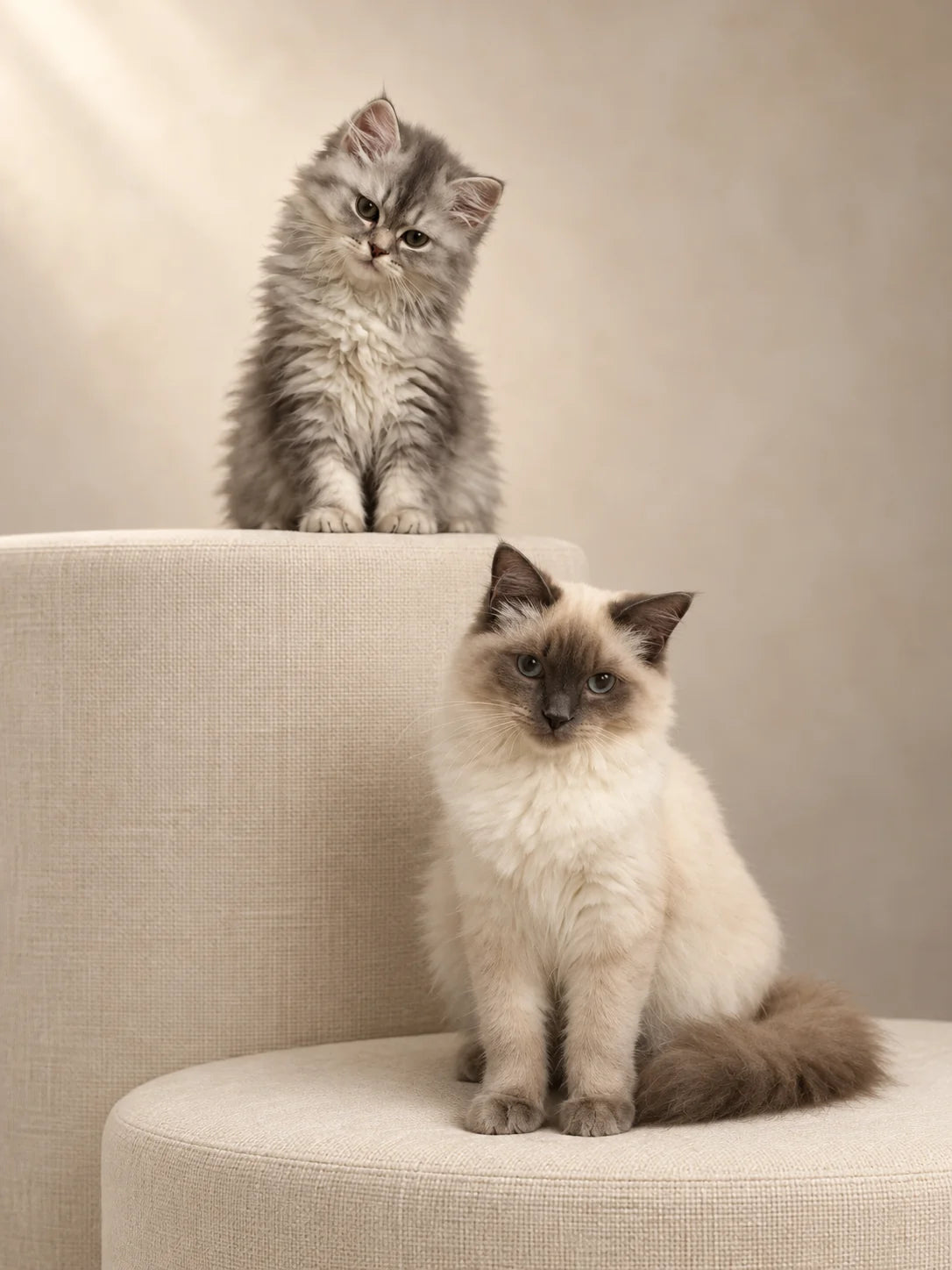
Same pets. A different setting.
Example created in ChatGPT.
Five ideas. Start with your own photograph.
Swipe to explore all five looks →
01 · THE IDEA
A busy background does not have to be the end of a lovely photograph. Here we replaced the bathroom setting with a quiet studio scene while asking for the cats’ individual features to stay recognisable.
Adapt the cats’ descriptions, positions and relative sizes to your photograph. This is the original brief; the studio example used a corresponding image-specific instruction.
Example instructions, not a guarantee that every detail will be preserved. Adapt the subject descriptions to your own pets.
Edit the attached photograph into an elegant, natural-looking portrait of these exact two cats. This is a photographic background replacement—not a painting or a newly imagined pair of cats.

Priority: preserve the cats' identity
Treat both cats as protected subjects. Retain their original faces, expressions, gaze directions, head angles, ear shapes, eye colours, noses, whiskers, fur markings, coat lengths and body proportions.
The small grey long-haired kitten remains above and to the left, with its existing head tilt. The larger cream cat with a darker face, ears and tail remains below and to the right. Preserve their relative sizes, seated poses and separation.
Do not make them more symmetrical, enlarge their eyes, change their expressions, straighten the kitten's head or substitute more generic-looking cats. Do not blend their features. Keep their visible anatomy and paws as photographed.

Replace the setting
Remove the entire bathroom background: toilet, tiles, doorway, walls, flooring and existing scratching-post structure.
Replace it with a quiet photographic studio setting in warm ivory and soft stone tones. Use a seamless matte background with a very subtle tonal gradient—not a flat cutout background, a room interior or a dramatic spotlight.
Support the cats on two simple, broad, cream fabric-covered platforms at the same heights as their original perches. The kitten's platform sits higher and farther back; the larger cat's platform sits lower and closer to the camera. Keep the supporting structure understated, with clean edges and fine woven upholstery. No scratching rope, elaborate furniture or decorative props.
Preserve the cats' existing positions rather than moving their bodies to fit the new setting. Ensure their paws and seated bodies make believable contact with the platforms, with soft contact shadows and no floating edges.

Light and photographic finish
Use soft, diffused daylight from the upper left, compatible with the original photograph. Gently lift the exposure on the cats so their existing facial detail reads clearly. Preserve natural differences between the grey kitten's coat and the larger cat's cream coat and darker markings.
Keep highlights controlled and shadows soft. No artificial eye glow, exaggerated catchlights, oversaturated eyes, plastic-looking fur, harsh sharpening or HDR effect. Retain the softness of real fur and the fine strands around their ears and whiskers.
Blend the replacement background carefully around the animals. No pale halos, hard cutout outlines, missing whiskers or smudged fur. Keep both cats in focus, with the background unobtrusive.

Composition
Produce a balanced portrait image in the original photograph's approximately 3:4 aspect ratio. Keep both cats as the clear focal point, with their full visible bodies and paws included. Leave comfortable space above the kitten's ears and around the sides and lower paws for later print cropping.
The result should feel like a beautifully photographed pair of beloved pets in a restrained, premium studio setting. Keep the cats recognisably themselves, including their individual quirks.
Do not add names, lettering, hearts, flowers, collars, costumes, frames, borders, logos, watermarks or extra animals.
Return only the finished photograph at the highest available native resolution. Before finalising, compare both cats with the source and prioritise their original likeness over cosmetic perfection.
You can select and copy this text manually.
Replace “warm ivory” with “soft stone grey”.
Untested variationFacial markings, whiskers, head tilt and believable contact with the platforms.
02 · THE IDEA
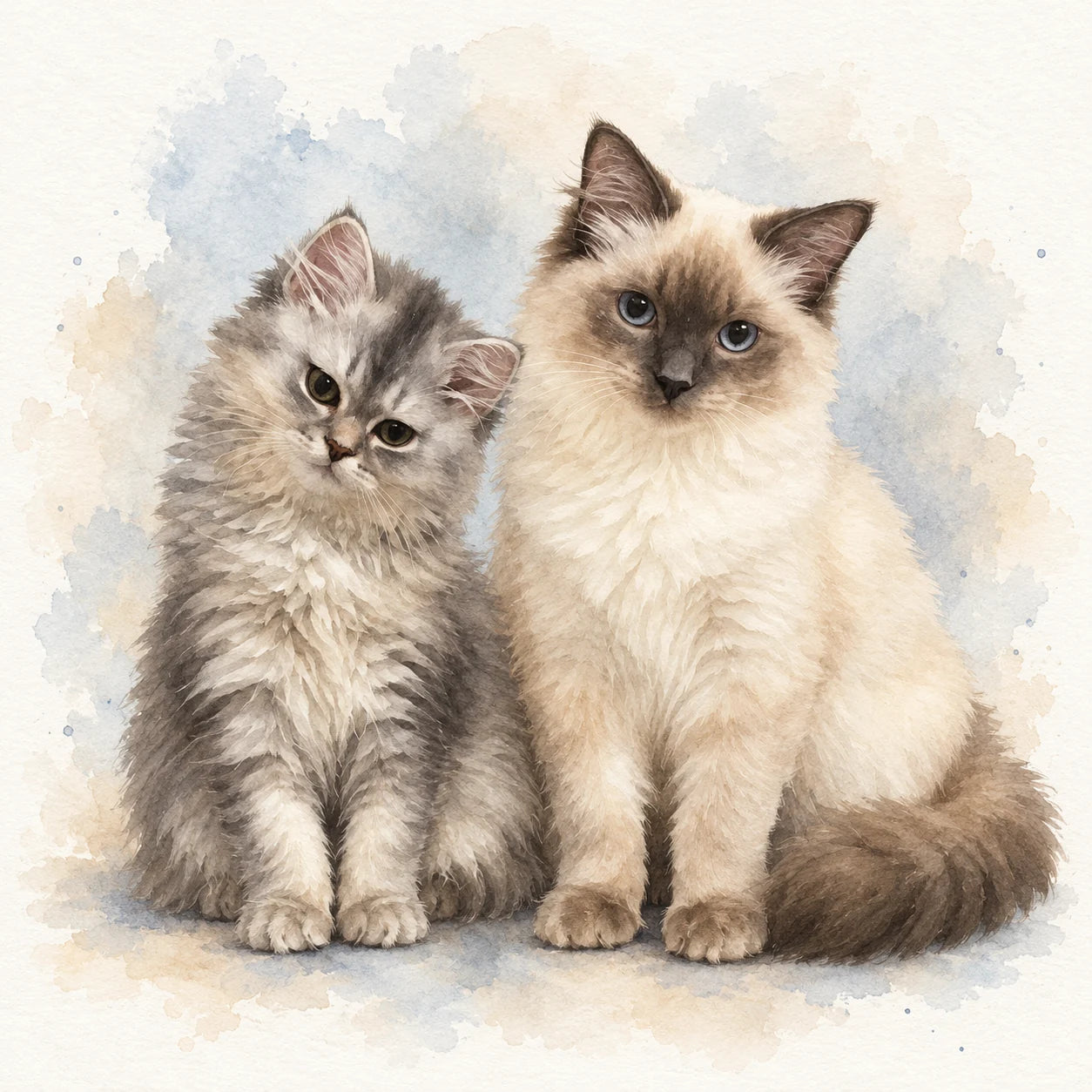
The same original photograph can become a completely different piece of artwork. This prompt brings the cats together in a soft painted composition.
Start from the original photograph, not the studio result. Adapt the number of pets and their real relative sizes.
Example instructions, not a guarantee that every detail will be preserved. Adapt the subject descriptions to your own pets.
Turn the pets in my attached photograph into an elegant watercolour portrait, sitting naturally beside each other on the same ground level.

Preserve each pet's individual identity. Closely follow their face shape, muzzle, ears, eye colour, coat colours, distinctive markings and fur length. Retain recognisable expressions and head tilts. Keep their relative sizes believable, with younger or smaller pets remaining smaller. Do not blend their features, make them identical or replace them with generic examples of their breed.

Remove the original background, furniture and other objects completely. Arrange the pets as a balanced group, close enough to feel together, with separate, clearly visible faces. Show naturally seated bodies and front paws, with anatomically believable proportions. Keep ears, paws and tails comfortably inside the artwork.

Style: refined watercolour on warm-white textured paper. Use delicate, controlled detail around the eyes, noses and faces, with softer layered brushwork through the fur. Let the outer edges gently dissolve into translucent washes. The result should look like watercolour artwork, not a photograph with a filter.

Colours: restrained pale blue-grey and warm oatmeal washes behind and beneath the pets. Preserve their natural coat colours. Leave generous clean space around the portrait, with subtle pigment blooms and only a few delicate paint flecks. Avoid bold splashes, heavy outlines, excessive saturation or cartoon features.

Use soft, natural-looking light and gentle shadows beneath the paws to ground the group. Keep eyes expressive but realistic—no enlargement or artificial glow.
Create a square composition, with the pets occupying approximately three-quarters of the image width and comfortable margins for printing.
Do not add names, text, hearts, flowers, costumes, accessories, extra animals, borders, frames or watermarks.
Return the finished artwork only, at the highest available native resolution. Prioritise the likeness of my pets over decorative effects.
You can select and copy this text manually.
Replace “pale blue-grey” washes with “muted sage”.
Untested variationRelative sizes, coat patterns and paws. The composition is deliberately reimagined.
03 · THE IDEA
Sometimes the photograph already has everything it needs. This example asks for a gentler colour balance and clearer light while keeping the original setting.
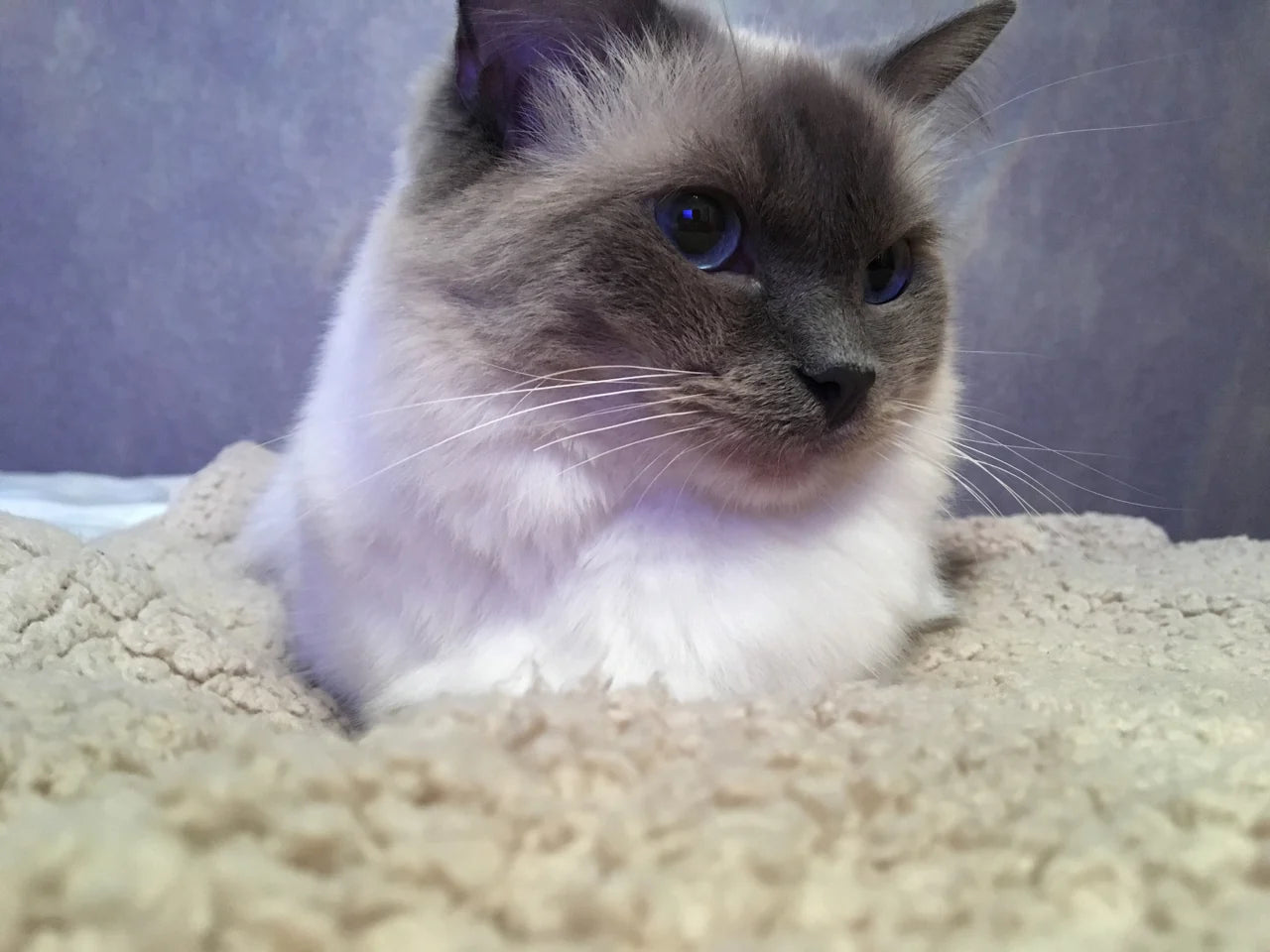
Adapt the blanket and sofa descriptions to your setting. Generative editing can subtly change geometry and detail; it is not pixel-identical restoration.
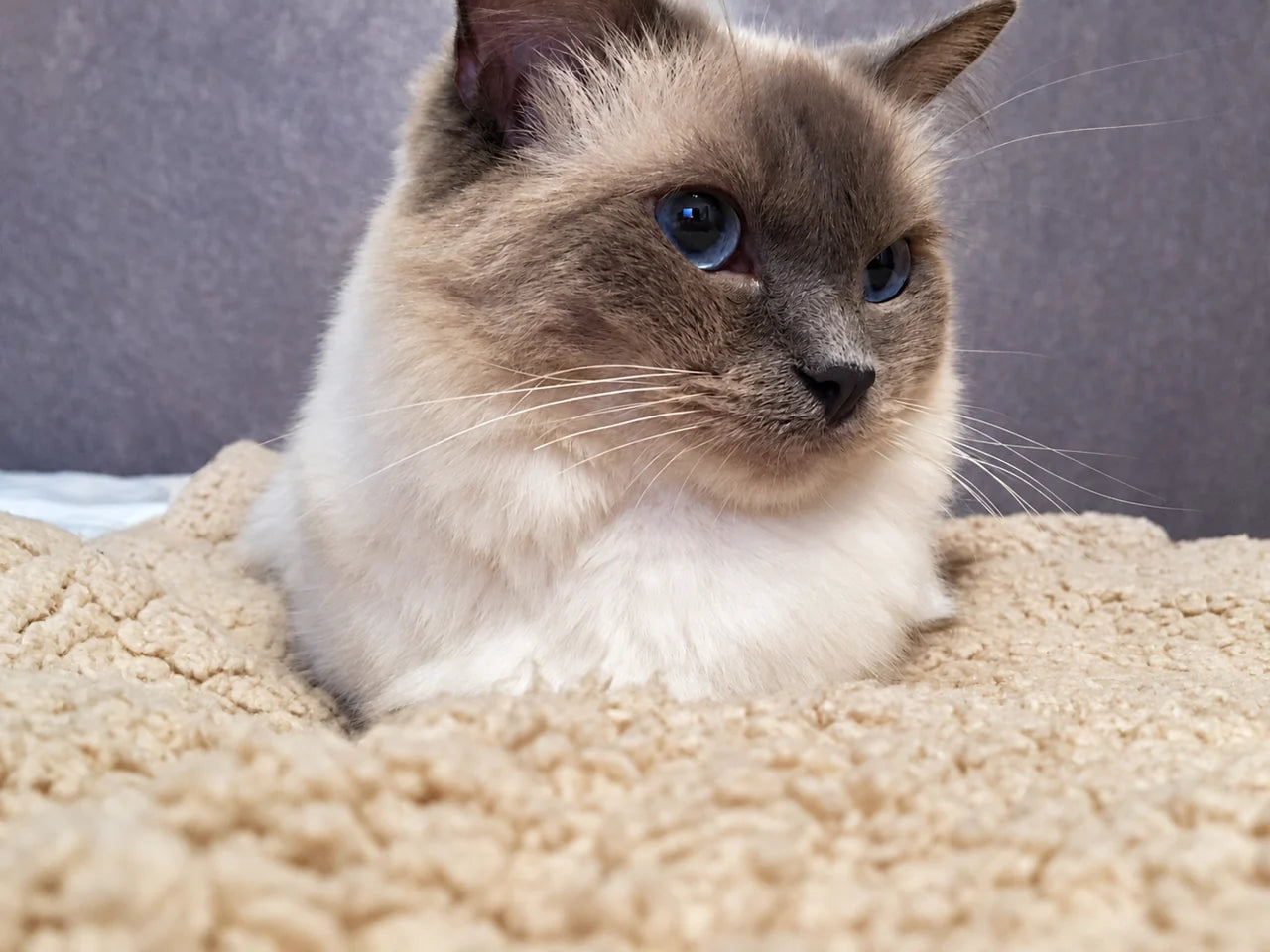
Example instructions, not a guarantee that every detail will be preserved. Adapt the subject descriptions to your own pets.
Improve my attached pet photograph with subtle, natural photographic adjustments suitable for a beautiful printed portrait.

Preserve the photograph and my pet's identity. Keep the exact pose, expression, head angle, eye shape, pupils, ears, nose, whiskers, coat markings, body proportions and fur length. Do not redraw the face, invent fur detail, enlarge the eyes or make my pet look younger or more symmetrical.

Keep the existing setting and composition. Retain the cream blanket, sofa and their natural folds and textures. Do not replace the background, add objects or remove parts of my pet. Preserve the original aspect ratio and framing.

Correct the colour gently. Reduce the cool blue cast so the cream blanket and lighter fur look naturally warm and neutral. Preserve the darker facial markings and the pet's genuine eye colour. Avoid yellow-tinted whites, orange fur or overly saturated blue eyes.

Improve the light without changing its character. Gently lift the face and recover visible detail in darker fur while retaining soft shadows and depth. Keep the pale fur and blanket from becoming washed out. Make the pet the natural focal point through restrained local exposure adjustments, without adding a spotlight or dark vignette.

Finish with care. Reduce distracting digital noise and apply modest sharpening only where existing detail supports it. Keep individual whiskers and fur edges delicate. Do not invent texture in blurred areas or use aggressive smoothing, HDR, artificial gloss or crunchy sharpening.

The finished result should look like the same photograph taken with slightly better light and more accurate colour—not an AI makeover. Preserve its relaxed, personal feeling.
Do not add text, names, accessories, borders, frames or watermarks.
Return only the edited photograph at the highest available native resolution. Prioritise faithful likeness and natural detail over dramatic enhancement.
You can select and copy this text manually.
Ask for a more restrained correction if the first result feels too polished.
Untested variationCompare eyes, fur and blanket detail with the original. Generated detail is not verified recovery of missing detail.
04 · THE IDEA
If your pets never cooperate for the same photograph, separate pictures can be used to create a shared portrait.
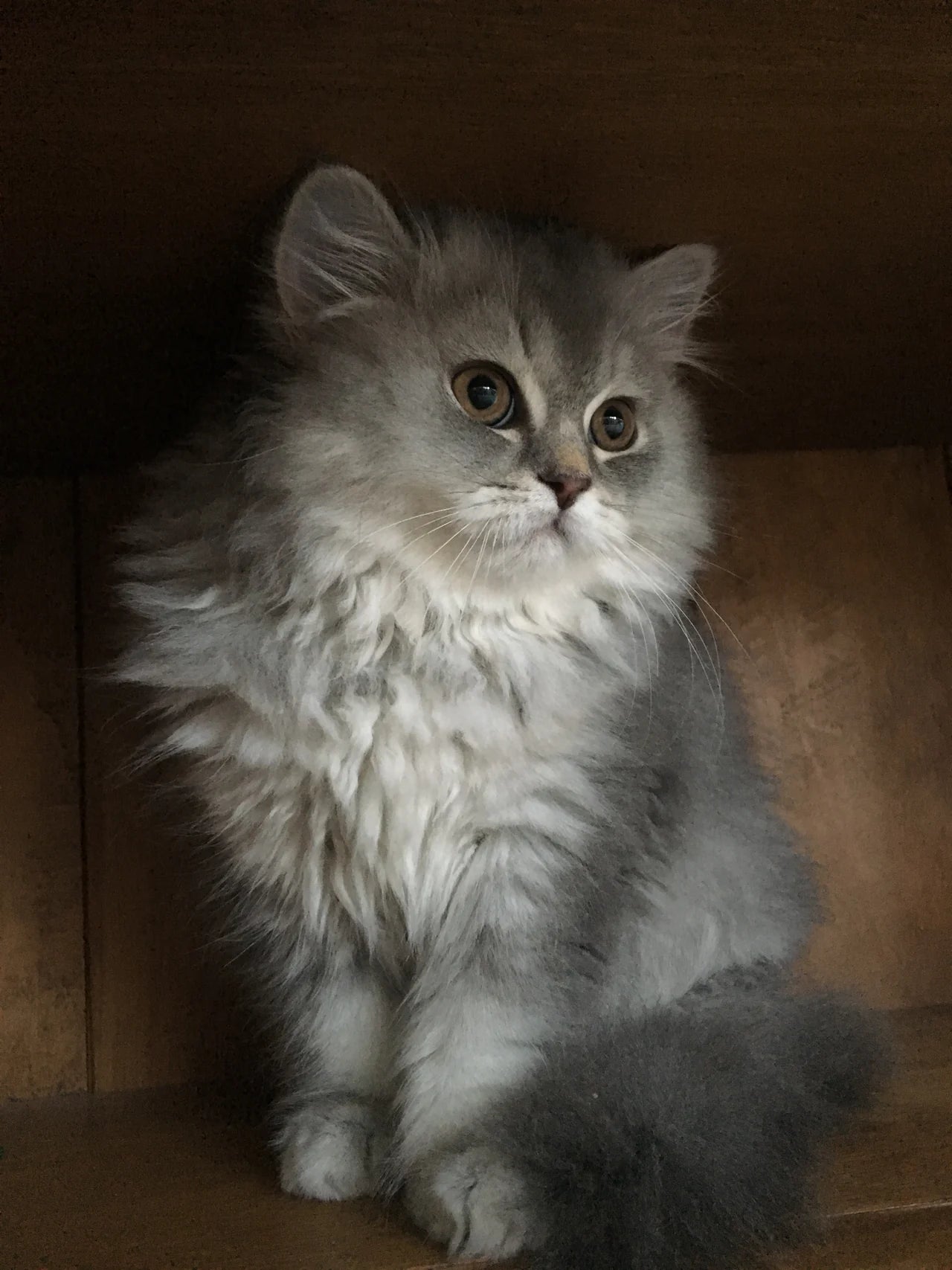
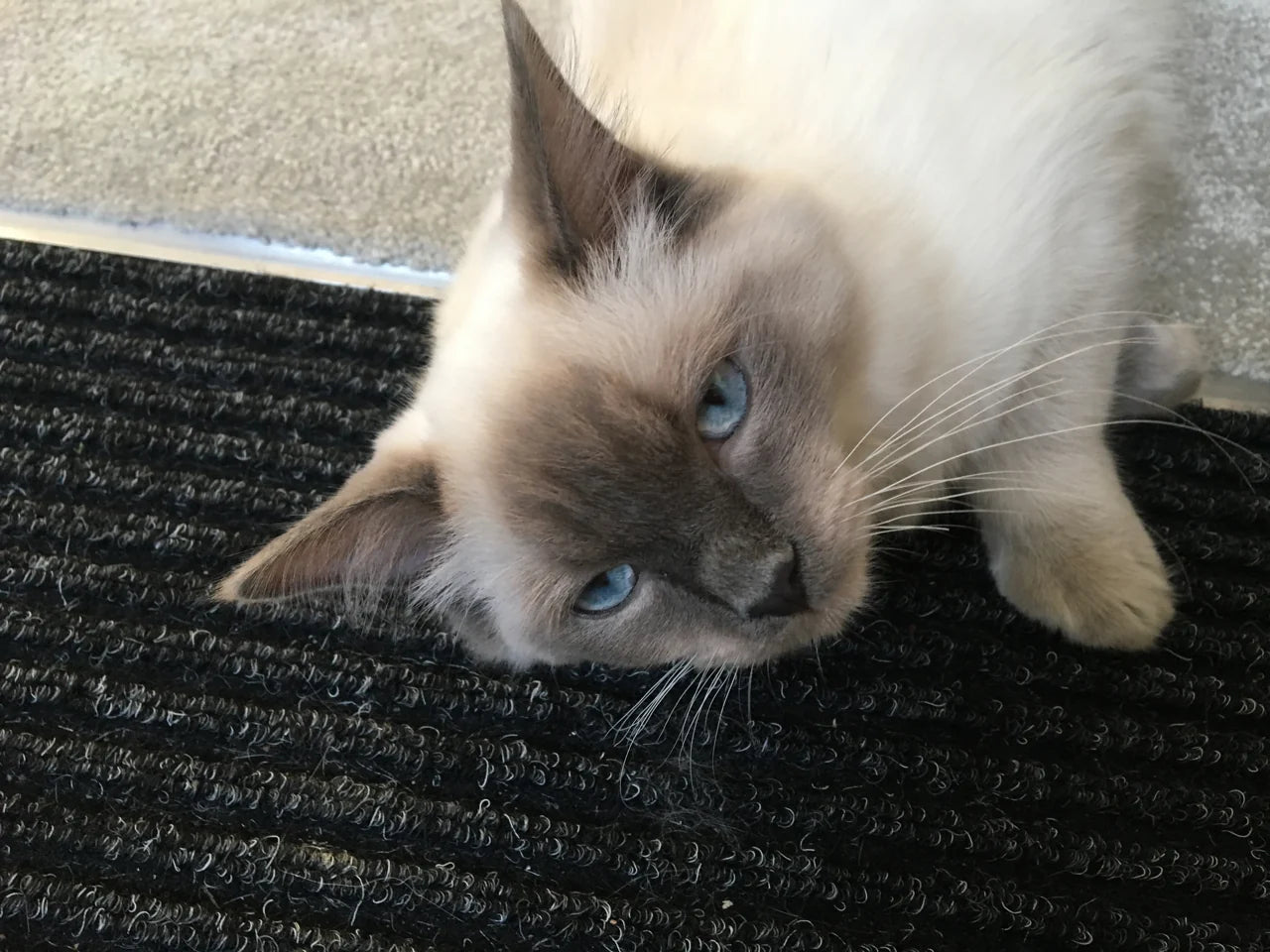
Upload a separate original for each pet. Adapt the left/right placement, coat descriptions and real relative sizes.
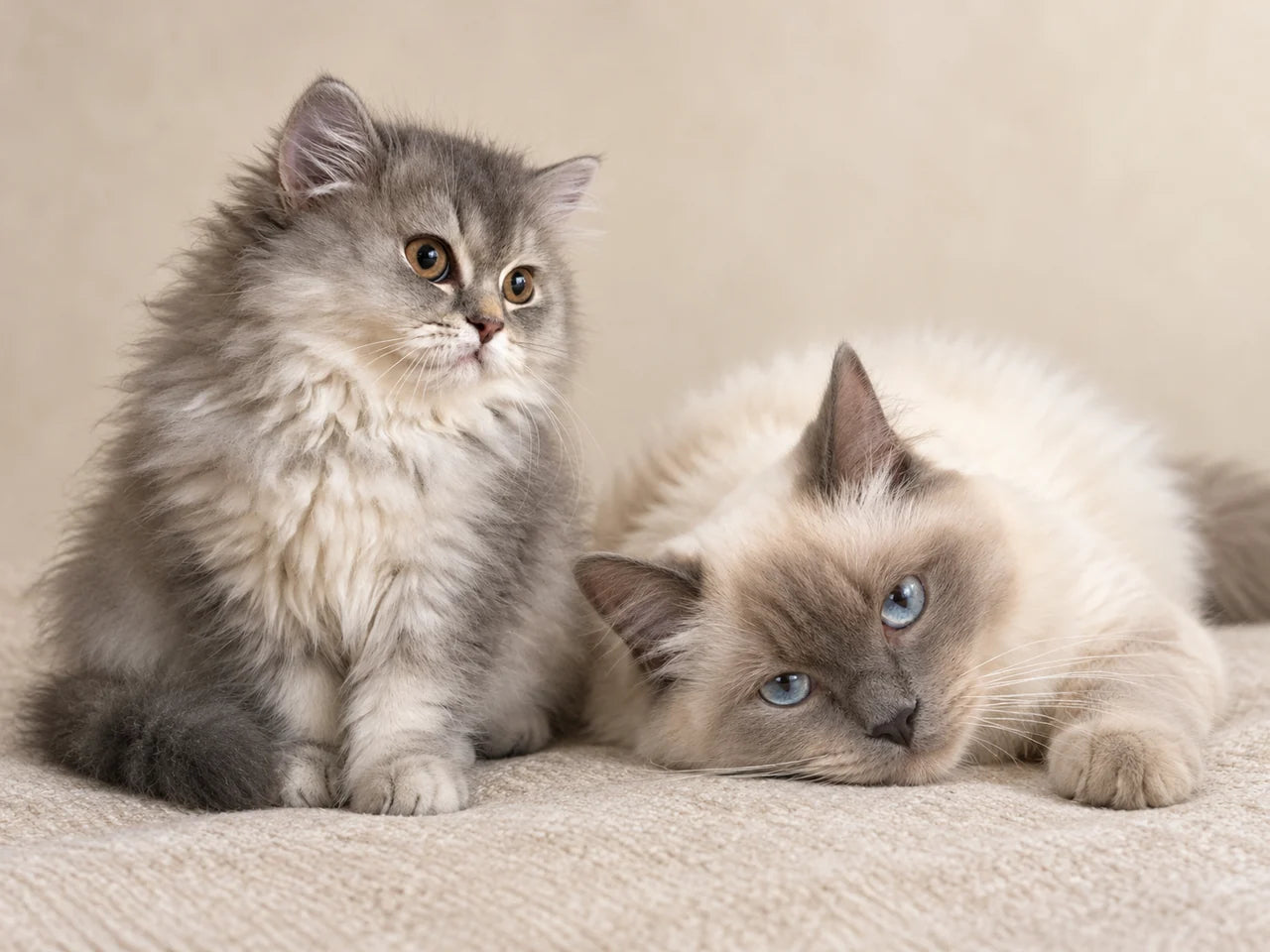
Example instructions, not a guarantee that every detail will be preserved. Adapt the subject descriptions to your own pets.
Create one elegant, photorealistic portrait featuring the two cats from my attached photographs together in the same setting.

Use each photograph as the identity reference for its own cat. The grey long-haired kitten must remain recognisably the kitten from its photograph. The larger cream cat with darker facial markings must remain recognisably the cat from the other photograph. Preserve their individual face shapes, expressions, eye colours, noses, ears, coat patterns and fur lengths. Do not blend their features or substitute generic cats.

Arrange them naturally without forcing new poses. Place the smaller grey kitten seated on the left and the larger cream cat reclining on the right. Retain each cat's original head angle, gaze and body position as closely as possible. They do not need to look towards the camera or in the same direction. Keep the kitten noticeably smaller, with believable proportions.

Position them close enough to feel like a relaxed pair, with a little space between their bodies. Keep both faces unobstructed. Do not make them hug, intertwine their paws or adopt matching poses. Preserve visible anatomy; keep any reconstruction of obscured areas minimal and anatomically natural.

Replace both original backgrounds with a single quiet studio setting: a warm ivory matte backdrop and a softly textured oatmeal fabric surface. Remove the dark mat, furniture and other original surroundings. No props or elaborate furniture.

Both cats must appear to rest on the same surface, photographed from one consistent camera position. Match their scale, perspective and lighting carefully. Add soft contact shadows beneath their bodies and paws so neither looks pasted in or floating.

Use gentle, diffused daylight from the upper left. Balance the different exposures and colour casts of the source photographs while preserving the natural differences between their coats. Keep the cream fur neutral, the grey kitten's markings distinct and their eyes naturally coloured.

Retain realistic fur texture, delicate whiskers and soft edges. Avoid artificial eye glow, exaggerated catchlights, plastic fur, excessive sharpening or a painted appearance. Keep both faces in focus.

Composition: landscape 4:3, with the pair occupying approximately 75–80% of the image width. Include their full visible bodies, ears, paws and tails, with comfortable space around them for print cropping. Keep the background simple and unobtrusive.

The result should feel like a believable photograph of these particular pets sharing a calm moment, with their different personalities intact.
Do not add names, text, collars, costumes, flowers, hearts, extra animals, frames, borders or watermarks.
Return only the finished portrait at the highest available native resolution. Prioritise each cat's likeness over making the arrangement perfectly symmetrical.
You can select and copy this text manually.
Specify which pet belongs on the left and describe their real relative sizes.
Untested variationIndividual likeness, scale, paws and consistent light. This is an imagined shared scene, not a photograph of the pets together.
05 · THE IDEA
For a more traditional finish, keep the pets’ natural expressions and let the brushwork provide the character.
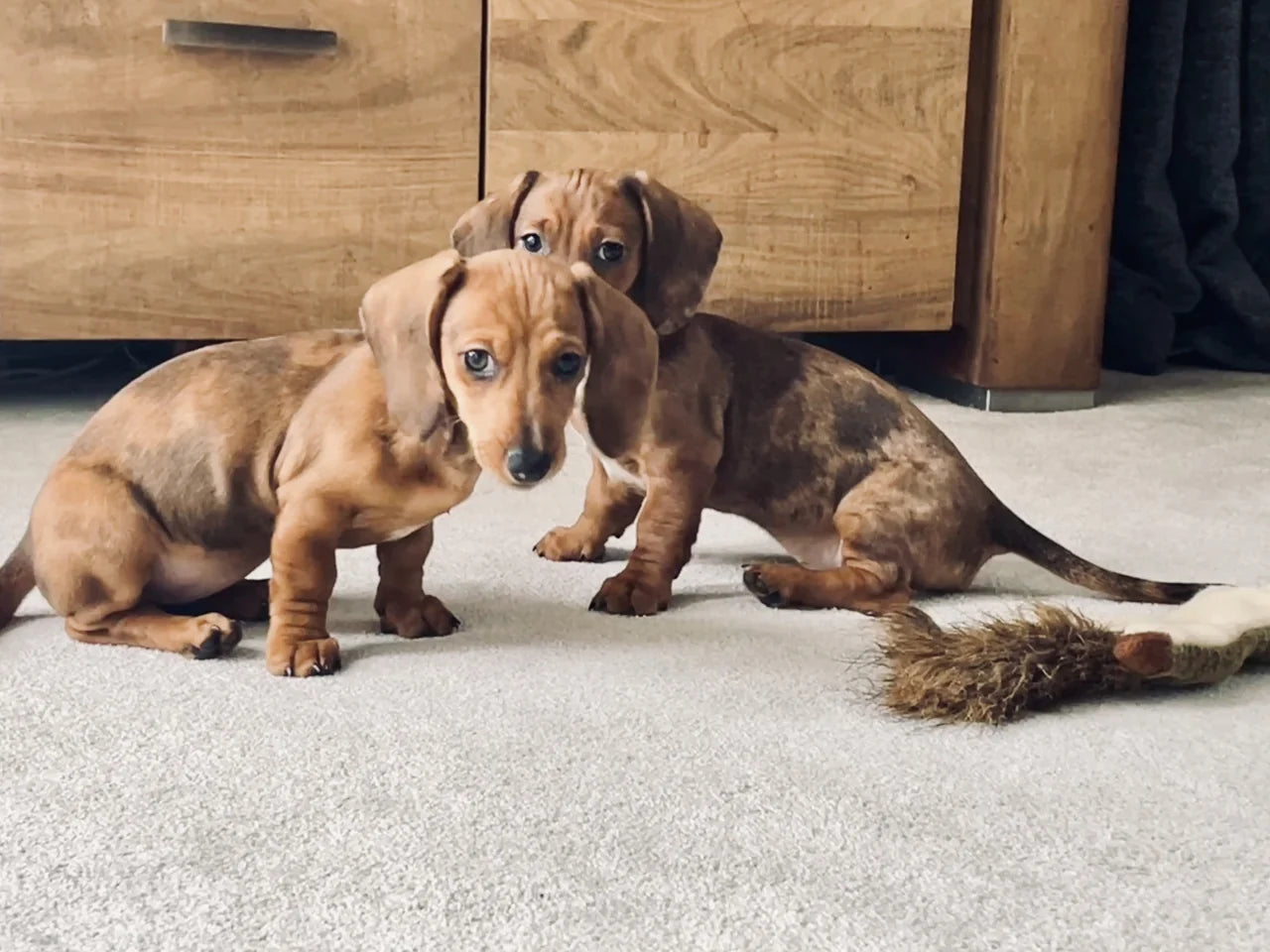
Adapt the breed and coat description to your own pets. This prompt includes the reddish-brown and mottled coat correction used for this result.
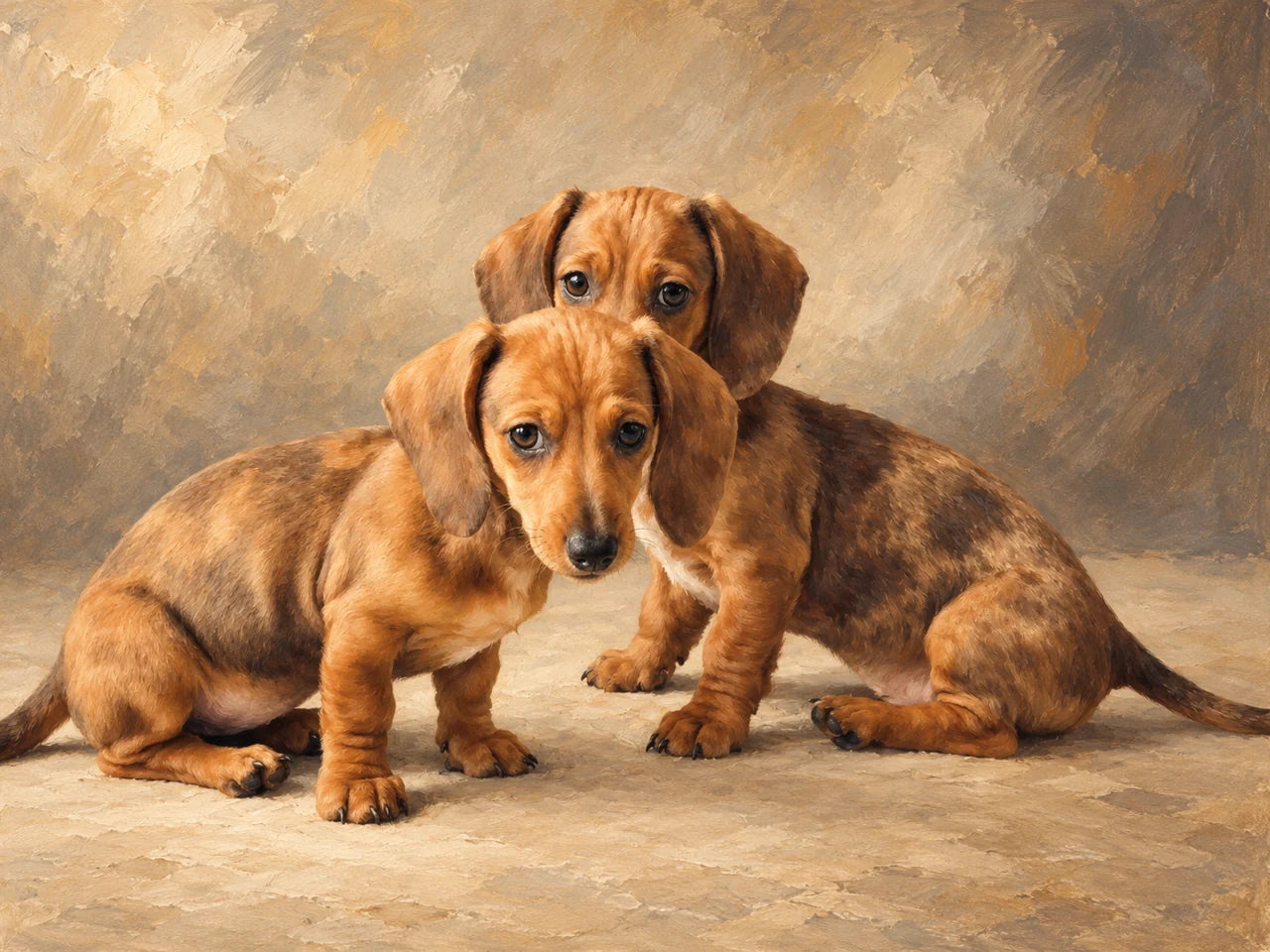
Example instructions, not a guarantee that every detail will be preserved. Adapt the subject descriptions to your own pets.
Create an elegant fine-art oil portrait of the two dachshund puppies in my attached photograph.

Their individual likeness is the priority. Preserve each puppy's face shape, muzzle length, ear shape, expression, gaze and distinctive coat markings. Keep their original reddish-brown colouring and individual darker mottled/dapple markings exactly as shown in the photograph. Do not recolour them black and tan. Do not make them identical or replace them with generic dachshunds.

Preserve their relationship and natural arrangement. Keep the puppy nearest the camera in front and the other slightly behind, following their original poses and head angles. Keep both faces clearly visible. Do not force them into matching seated poses or make them unnaturally symmetrical. Retain believable puppy proportions, short legs and long ears.

Remove the furniture, carpet pattern, toys and other household distractions. Replace the setting with a quiet, softly painted warm stone background and a simple neutral surface beneath them. Use subtle tonal variation rather than a flat backdrop. Ground their bodies with gentle shadows.

Painting style: a refined traditional oil portrait with visible but restrained brushwork. Give the faces, noses and eyes careful detail, then allow broader, softer strokes through the coats and background. Keep the puppies recognisable while making the result unmistakably a painting. Avoid the appearance of a photograph with a texture filter.

Use a restrained palette of warm ivory, soft taupe, charcoal and natural ochre. Preserve depth and variation in the darker coat markings rather than turning them into solid shapes. Keep the reddish-brown fur natural, without making it bright orange.

Light the puppies softly from the upper left. Give their eyes small, believable reflections without enlarging them or adding artificial sparkle. Keep the mood affectionate, calm and personal.

Composition: landscape 4:3, with both puppies forming one balanced group and occupying approximately three-quarters of the artwork's width. Leave comfortable space around their ears and visible paws for printing. Avoid cropping important features. Do not invent extra limbs or extend hidden anatomy unnecessarily.

The finished artwork should feel like a thoughtfully commissioned portrait of these particular pets, suitable for a beautiful canvas in a contemporary home.
No costumes, crowns, collars, flowers, hearts, decorative furniture, names, text, signatures, frames, borders or watermarks.
Return only the finished artwork at the highest available native resolution. Prioritise faithful faces, natural anatomy and a convincing painted finish.
You can select and copy this text manually.
Ask for a cooler stone background or looser brushwork away from the faces.
Untested variationEach puppy’s different coat pattern and expression. Keep their reddish-brown colouring and darker mottled markings.
START WITH YOUR PHOTOGRAPH
Use your own clear photograph, not the example artwork on this page. For the shared portrait, choose a separate photograph of each pet.
Attach your original photograph to a ChatGPT conversation. Add both originals if you want to bring pets together.
Copy the matching prompt. Change the pet descriptions and setting details to suit your photograph, then send it with your image.
Compare the result with your original. Check faces, markings and anatomy, then save the actual image file to your device rather than taking a screenshot.
These examples were created in ChatGPT. Results vary, and availability or usage limits depend on the service you use. See OpenAI’s image help.
SMALL CHANGES, MORE PERSONAL RESULTS
Keep eyes, ears and distinctive markings visible. Prefer the original camera file to a screenshot.
Name the muzzle shape, coat patches, eye colour, expression and relative size that make your pet recognisable.
Give a precise correction and refer back to the original photograph. Check each revision before asking for another change.
Save the image file, not a screenshot of the preview. Keep your original photograph separately.
Inspect likeness and anatomy at full size. Leave crop space and compare pixel dimensions with your chosen print size. Changing a DPI label alone does not add detail.
Suggested follow-ups — untested variations
“My pet’s markings have changed. Refer back to the original photograph and restore those markings while keeping the approved background and style.”
“The eyes look too bright. Match their colour, size and reflections more closely to the original photograph.”
“Add more background space around the existing composition without enlarging, repositioning or changing the pets.”
Check the revised result too. For help choosing a source, read our photo-selection guide. Before printing, see our canvas wrap guide.
FROM YOUR SCREEN TO YOUR WALL
Download your finished artwork, upload it to our builder and choose your print.
Create and edit your image separately. YI2C prints your finished file; AI editing is not part of our print builder.
TEXTURE & DEPTH
From £14.99 · A5 slim canvas
Your finished artwork, hand-stretched on canvas. Check the front crop and choose the sides that suit your composition.
READY FOR YOUR FRAME
From £5.99 · A5 poster
A smooth matte paper print for your own frame. Supplied unframed, with standard and custom sizes available.
3 for 2 on Canvas and Poster prints. Lowest-priced qualifying base print free; frames and extras are charged separately. View the print offer and terms.
Order before 2pm Monday–Friday for dispatch on a 24-hour service. Next-working-day delivery is expected, not guaranteed. Bank holidays and delivery exclusions apply. Read the delivery details.
A FEW USEFUL ANSWERS
Yes. Start with the original file where possible, with the face, eyes, ears and markings clearly visible. A sharp, well-lit photograph gives you more to work with than a tiny screenshot.
Yes. The shared portrait example uses two separate originals. Describe each pet, their real relative sizes and where they should appear. The result is an imagined scene, so check scale, lighting and anatomy.
Not necessarily. A prompt can ask for faithful likeness, but generated edits may change markings, eyes, fur or proportions. Compare the result with your original and make precise corrections before printing.
No. These examples were made in ChatGPT, but you can try the ideas in another image-editing service that supports reference photographs. Results, features and usage limits vary. YI2C prints your finished file.
Yes, if the finished file is suitable for the size and crop you choose. Download it, upload it to the existing YI2C print builder and review your print. AI editing is done separately; it is not a service inside our builder.
Keep the highest available native-resolution download and check its actual pixel dimensions. Suitable print size depends on detail, crop and viewing distance; there is no single size that makes every AI result print-ready. A higher DPI label or an enlarged file does not create genuine missing detail.