
YOUR PHOTO. THEIR PERSONALITY.
Funny pet portraits.
Made personal.
Football shirts. Questionable awards. A very serious swim in a very small puddle. Start with your own pet’s photograph, then make the idea yours.
You know your pet’s little habits. The sock that disappears whenever you put the washing down. The dog who can hear a cheese packet opening from the other end of the house. The one who approaches the tiniest puddle as if they are training for an Olympic final.
Those details are a lovely starting point for a picture. You can turn them into a football portrait, a very questionable achievement award or a swimming adventure, using a photograph you already have and an AI image editor.
You do not need to commission a digital portrait simply to try an idea. If you enjoy the creative part, you can make and refine the artwork yourself, then choose a canvas or poster to suit the finished file. A commissioned piece can still be worthwhile when you want someone else’s creative skill and time. This guide gives you another route.
We made the examples here in ChatGPT, using our own dog photograph. It is the tool we used to develop the ideas, generate the pictures and refine the results, so that is the process we describe. The prompts are here for you to edit and try with your pet. They are reusable versions of the briefs used for these pictures, not a promise of an identical result. Our studio portrait was developed through an earlier plain navy-shirt version; the after-match pub portrait was refined from a clean-shirt pub scene.
Our workshop recommendation for this type of AI artwork is a canvas front of 16 × 20 inches or smaller, depending on the actual file and crop. Square artwork needs a square composition or a considered new crop. The photograph, generated detail, wrap allowance and chosen size still need to work together; the size recommendation does not approve every file.
MAKE THESE IDEAS YOURS
Start with your pet.
Change these details, then use Apply choices inside any example. You can always edit the complete wording before copying.
Start with a photograph where your pet looks like themselves
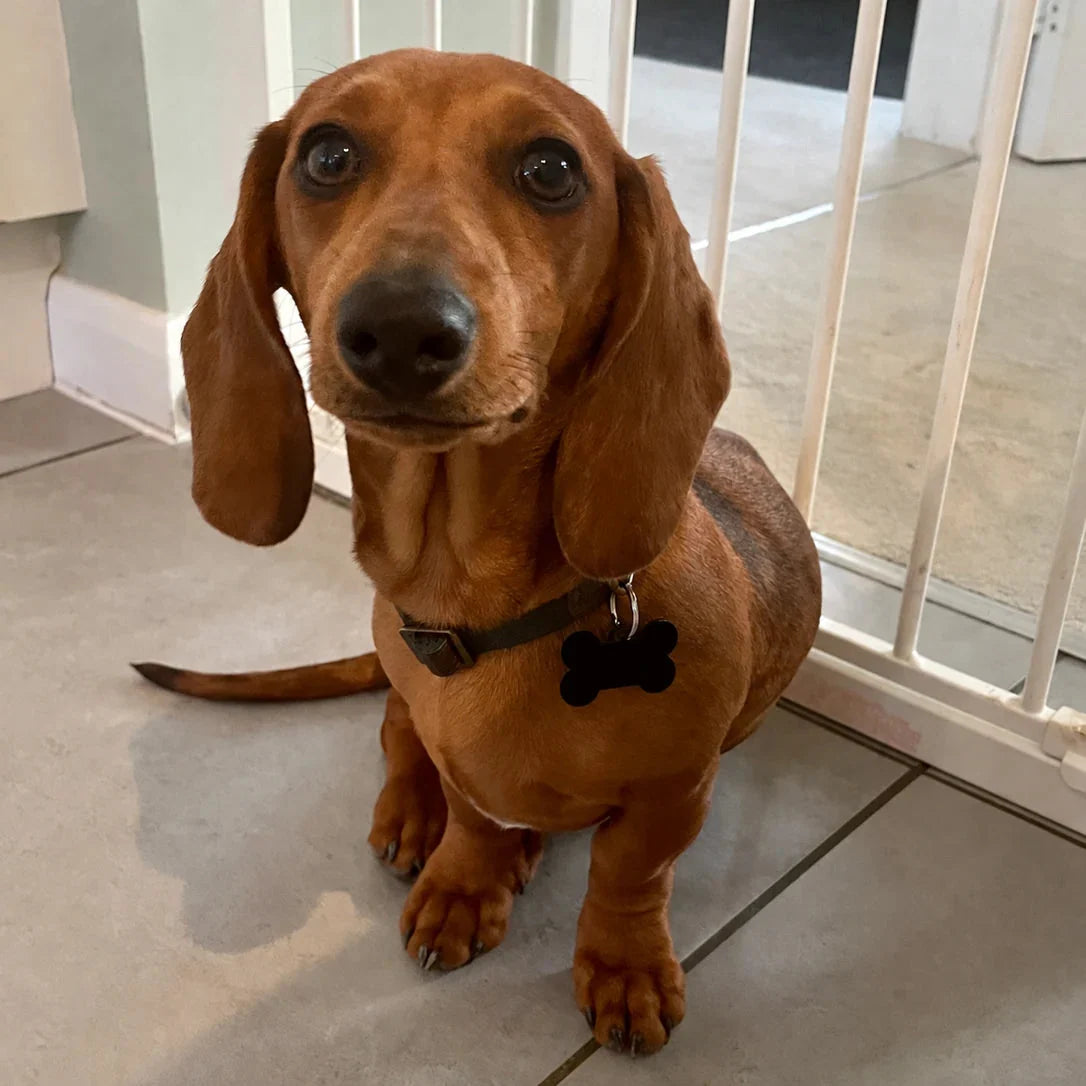
Our source was an ordinary photograph taken at home, with a tiled floor and a baby gate behind the dog. There was no studio, special backdrop or football shirt. What mattered was being able to see the face, ears, chest and paws.
You do not need a perfect setting. An AI editor can help imagine a different one. A useful photograph of your own pet is a better starting point than an elaborate idea attached to a blurred face.
Look for:
- Sharp eyes and a readable muzzle. Zoom in. Can you see detail, or does the face dissolve into softness?
- Natural, even light. Daylight by a window or gentle outdoor shade can make fur and markings easier to see than a dark room with strong flash.
- The features that make your pet recognisable. Keep ears, whiskers, unusual markings and the shape of the face inside the frame.
- Enough body for the idea. A face-and-chest photograph can suit a portrait. A seated dog with visible front paws gives you more to work with for shirts, awards and other small scenes.
- A comfortable viewpoint. Getting down towards the animal’s eye level can help. A photograph from above can still work, but its proportions and perspective become part of the reference.
Use the original file where possible. A screenshot or a copy passed through messaging apps may contain less detail than the photograph saved on your phone. Keep that original safely and make separate files for the artwork.
A second photograph can clarify a feature the first hides. Explain its purpose: “Use photograph one for the pose and overall appearance; photograph two only shows the white patch beneath the chin.” Do not leave the tool guessing whether the references show one pet or two different animals.
You are not choosing from a fixed menu
The examples below are starting points. Your dog does not have to like football, steal socks or go swimming. Their own habits, your family jokes and the person you are making the picture for are the useful ingredients.
Before asking for a finished image, try asking the AI to help develop the idea. You can start in everyday words:
Ask for ideas that fit your pet
Attach your own pet photo in ChatGPT or your chosen image editor. These controls prepare text; they do not generate an image.
Apply choices updates the text; manual edits stay until you choose to rebuild.
This is an editable planning prompt, rather than one of the demonstrated image prompts below. Replace the bracketed details before using it.
Tell the tool what makes you smile about the pet: the expectant look, the permanently muddy paws, the need to supervise every meal. Then choose a setting and a visual style. “Funny” does not have to mean a cartoon. A straight-faced photographic portrait in an absurd situation can be just as affectionate.
For a gift, think about the recipient too. Their favourite colours, hobby or familiar phrase can make the result feel personal. A short title such as “Head of Cheese Inspection” may say more than a long paragraph squeezed into the image.
Ask for captions and award titles
Attach your own pet photo in ChatGPT or your chosen image editor. These controls prepare text; they do not generate an image.
Apply choices updates the text; manual edits stay until you choose to rebuild.
Your first portrait, from photograph to finished file
If you have never tried this before, start with one pet, one clear idea and a quiet background. You can add the grand entrance, ridiculous trophy cabinet or muddy football story after you have a face you recognise.
- Choose the original photograph. Pick the clearest view of the face and enough of the body for your idea. Keep it saved separately; you will return to it when checking likeness.
- Write down three things that make the pet yours. Perhaps one ear folds differently, there is a pale patch below the chin, or the expression is always slightly suspicious. Give the tool those details alongside the photograph.
- Pick the story before the decoration. “A dog who takes cheese inspection far too seriously” gives you a stronger starting point than a long list of lights, costumes, trophies and special effects. Decide whether you want a photograph, painting or illustration.
- Attach references with clear roles. In ChatGPT, upload the pet photograph and describe the picture you want. Add a separate shirt reference if a particular football kit matters. Say which image supplies the pet and which supplies the clothing.
- Check the first result before adding more. Look at the eyes, muzzle, ears and markings. If the pet feels wrong, fix that first. A beautiful room will not make an unfamiliar dog feel like yours.
- Refine one thing at a time. Save the version you like, then change the shirt, wording, background or crop in a separate request. Keep comparing with the original photograph after each edit.
- Download, inspect and then choose the print. Save the actual finished image rather than taking a screenshot. Check its pixels and fine detail, then plan the print shape, front and edges. The print size should follow the file.
There is no special phrase you have to know. You can tell ChatGPT, “I like the idea, but this no longer looks like my dog. Compare the face with the original and help me correct it.” Explain the problem in ordinary words. A precise observation is more useful than simply asking for “better quality”.
Keep the pet and the invention separate
Describe what must stay recognisable: the eyes, muzzle, ears, coat markings, natural expression and body proportions. Then explain what you want to invent: clothing, props, setting, lighting or an illustrated treatment.
A dachshund should still have a long, low body and short legs when a shirt goes on. A paw resting on a table should look like a paw, with a believable body behind it. The scene can be imaginary without every physical detail becoming random.
If you attach more than one reference, give each a clear job:
- Pet photograph: likeness, coat, features and natural proportions.
- Clothing reference: the shirt or garment you want to use.
- Approved artwork: a colour palette or visual style you want to carry into another picture.
An approved result can guide the next image’s style, but keep your original pet photograph available. It is the better reference for checking whether the familiar face is drifting.
A prompt you can reuse for almost any idea
Build the request in this order: whose pet, what stays familiar, what changes, the visual style, the composition, and what to leave out. You can keep those six parts and replace only the scene.
| Part of the brief | A useful example |
|---|---|
| The reference and its role | “Use photograph one for my pet; photograph two only shows the shirt.” |
| The recognisable features | “Keep the long rounded ears, brown eyes, white chin patch and naturally short legs.” |
| The one clear story | “A very serious cheese inspector beside one small tasting board.” |
| The artistic direction | “A natural window-lit photograph” or “a restrained gouache painting in green and cream”. |
| The print composition | “Keep the complete ears, visible paws and title inside the central front; extend only the background for wrap.” |
| The distractions to avoid | “No human hands, extra legs, busy decorations, room mock-up or extra words.” |
A longer prompt is useful when the detail has a purpose. Repeating “8K, ultra-detailed, masterpiece” will not check the face, produce a particular native pixel count or reserve the right canvas allowance. Describe what the finished picture needs to show, then inspect what the tool actually gives you.
Can I turn my dog into a football player?
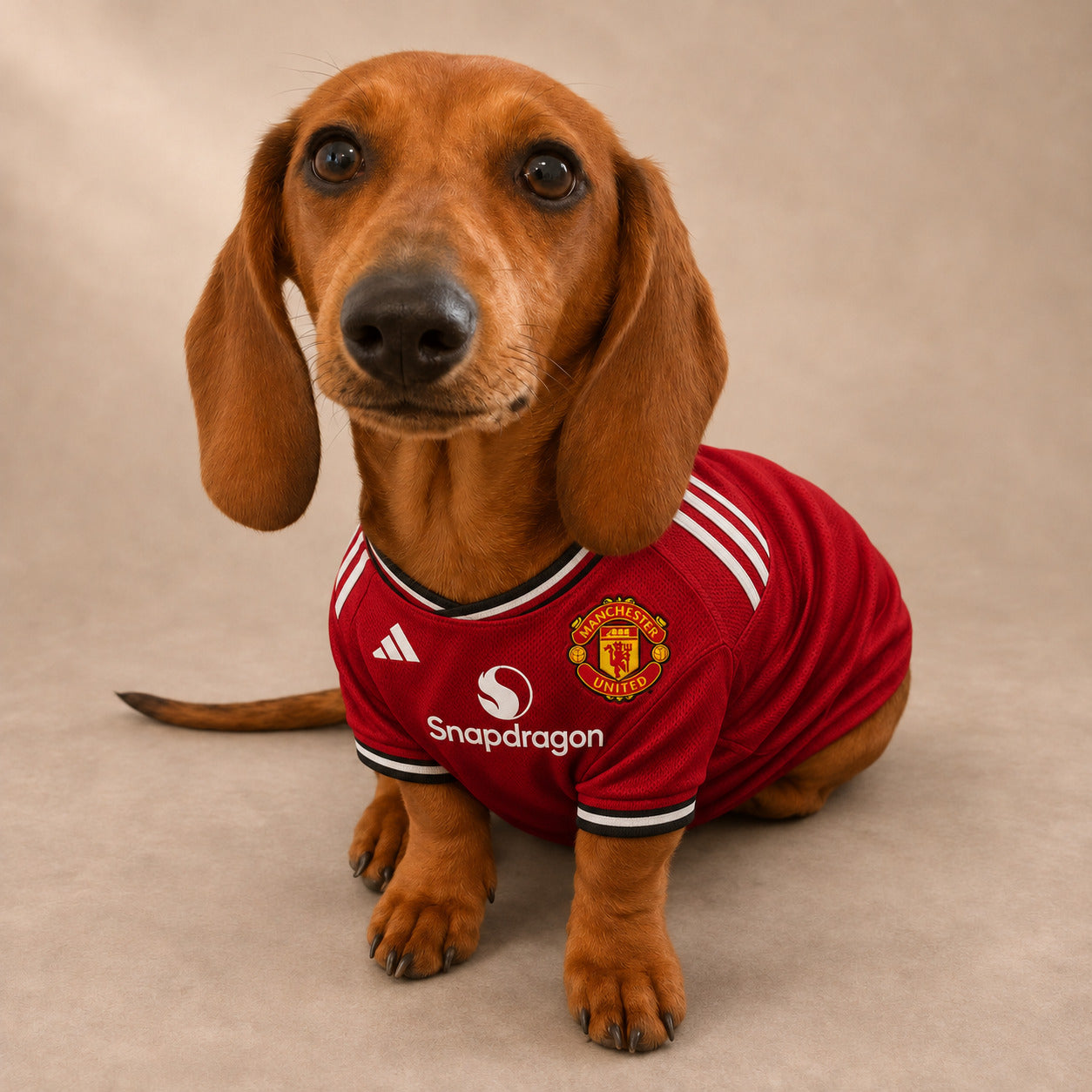
Yes—you can ask for a football portrait using your own dog photograph, then choose the colours, shirt and setting. You might prefer a simple seated portrait, a match-day pub scene or something more atmospheric beside the pitch.
You can choose a real football team or invent a club around your pet. We have included both: Lulu in a Manchester United shirt, followed by original dog-club designs using personal colours and badges. Choose the route that makes the picture right for you.
A real team shirt is a different brief from “use these colours”. If the actual kit matters, name the club and attach a clear shirt photograph. For a personal club, describe the colours and badge you want. The prompts below keep those choices separate.
Your pet, your actual football team
If the present is for a United supporter, the real shirt may be the whole point. Here is the Manchester United version we made with Lulu. The familiar little face carries the picture; the shirt gives it the personal connection.
Use my pet photo with a real football team shirt
Attach the reference images described in this prompt. These controls prepare editable text; create the image in ChatGPT or your chosen image editor.
* Wrap choices use the worked 1-inch-depth example in the canvas section. Other depths need their actual allowance. Changing a field keeps your manual prompt edits. Choose Apply choices when you want to rebuild the text.
Make the kit specific. You might want a favourite old home shirt, an away kit, a national team or the local club someone has supported for years. Write the season if it matters and add a reference. “Manchester United shirt” on its own leaves plenty of room for the tool to choose a different collar, badge treatment or sponsor from the one you had in mind.
Tell it which reference does what: photograph one is my pet; photograph two is the shirt. The model should borrow the clothing design, not the body, face or pose of a person wearing it. A flat shirt photograph or clear product view can make those instructions easier to follow.
| If you want… | Put this in the brief | Check afterwards |
|---|---|---|
| The actual team kit | Club name, home/away choice, season if important, and a shirt reference. | Crest shape, collar, shirt pattern, manufacturer and sponsor wording. |
| An older favourite | The exact season or shirt photograph, rather than “retro”. | No mixture of an old design with a newer sponsor or badge treatment. |
| Your own dog club | Two or three colours, an original badge and a name such as Lulu FC. | Legible personal wording and a badge that matches your chosen design. |
| A real local team | Your own clear photograph of the relevant shirt, including its smaller badge. | The kit follows that reference rather than a better-known club with similar colours. |
Look closely at the finished badge and any lettering. A shirt can look convincing at a glance while small details are inconsistent. If those details matter to the person receiving it, correct them before printing or choose a composition where the face and colour carry more of the picture. A named team and a long prompt are not a guarantee of an exact kit replica.
Already love the portrait? Change the shirt.
You can keep the approved pose and setting as the starting point, then ask for the team shirt you want. Save the earlier version first and compare the face again after the edit.
Change an approved portrait to my chosen real team
Attach the approved portrait you want to edit, plus the shirt reference. Keep the original pet photo available to compare the face. This is a new reusable edit prompt, not the recovered original generation record.
* Wrap choices use the worked 1-inch-depth example in the canvas section. Other depths need their actual allowance. Changing a field keeps your manual prompt edits. Choose Apply choices when you want to rebuild the text.
The prompts are editable briefs to try with your own photographs. They do not promise an identical result to Lulu’s image. The other football examples below use fictional clubs by choice; you can also adapt their settings with the real-team instructions above.
Home colours, a quiet background
A simple studio setting is a useful first attempt. It puts the familiar face, the shirt fit and the expression where you can see them clearly. Change the shirt colours and fictional club wording in the prompt to suit the person you are making it for.
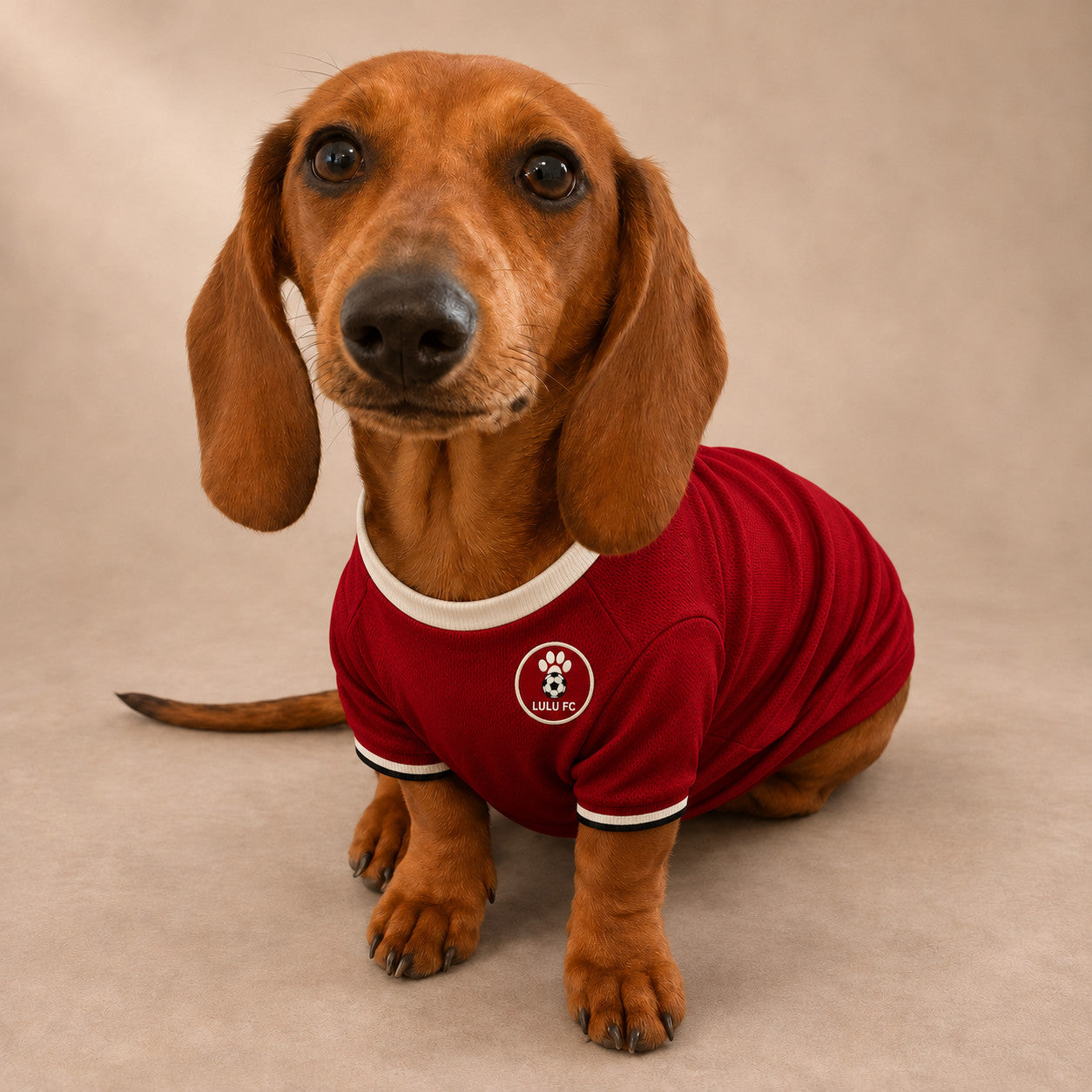
Personalise & copy the prompt
Attach your own pet photo in ChatGPT or your chosen image editor. These controls prepare text; they do not generate an image.
* Wrap choices use the worked 1-inch-depth example below. Other depths and finishes need their own allowance. Apply choices updates the text; manual edits stay until you choose to rebuild.
Make it yours: choose two or three shirt colours, a fictional club name and a quiet background tone. Keep the dog’s natural seated proportions and full ears and paws in the brief.
A quiet pint after the match
A pub scene gives the picture a little story. For this version, the football is over: a little mud on the shirt and ears, a pint beside the dog and the familiar face enjoying a quiet moment. A close head-and-upper-chest portrait lets the expression carry the scene without trying to invent a human-shaped body.
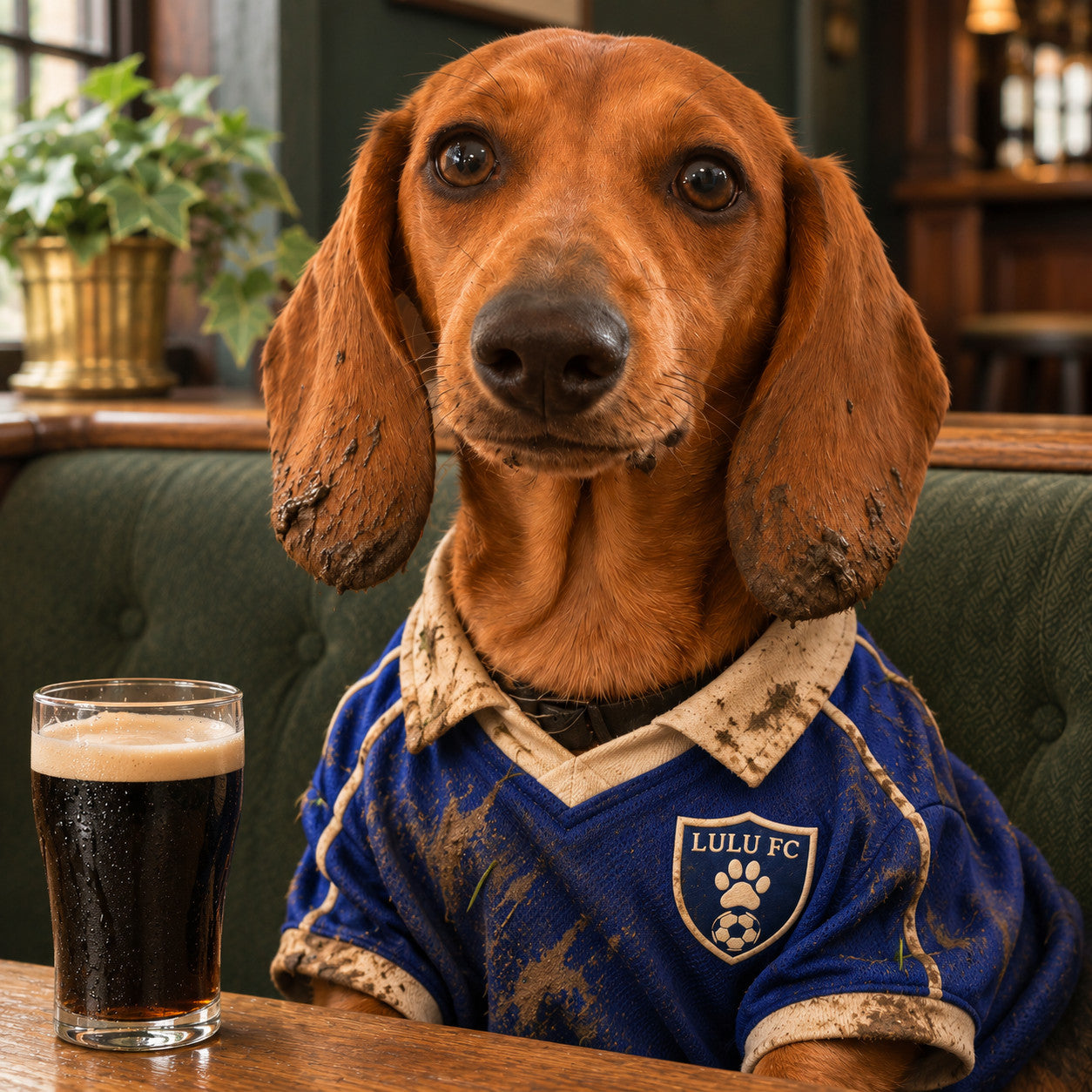
Step 1 · make the pub portrait
Attach your own pet photo in ChatGPT or your chosen image editor. These controls prepare text; they do not generate an image.
* Wrap choices use the worked 1-inch-depth example below. Other depths and finishes need their own allowance. Apply choices updates the text; manual edits stay until you choose to rebuild.
Then ask for the after-match change
The clean-shirt pub image was our starting point. The following prompt was used to develop the muddier close portrait, so attach your approved pub picture at this step.
Step 2 · add the muddy after-match story
Attach your own pet photo in ChatGPT or your chosen image editor. These controls prepare text; they do not generate an image.
* Wrap choices use the worked 1-inch-depth example below. Other depths and finishes need their own allowance. Apply choices updates the text; manual edits stay until you choose to rebuild.
See the earlier pub version
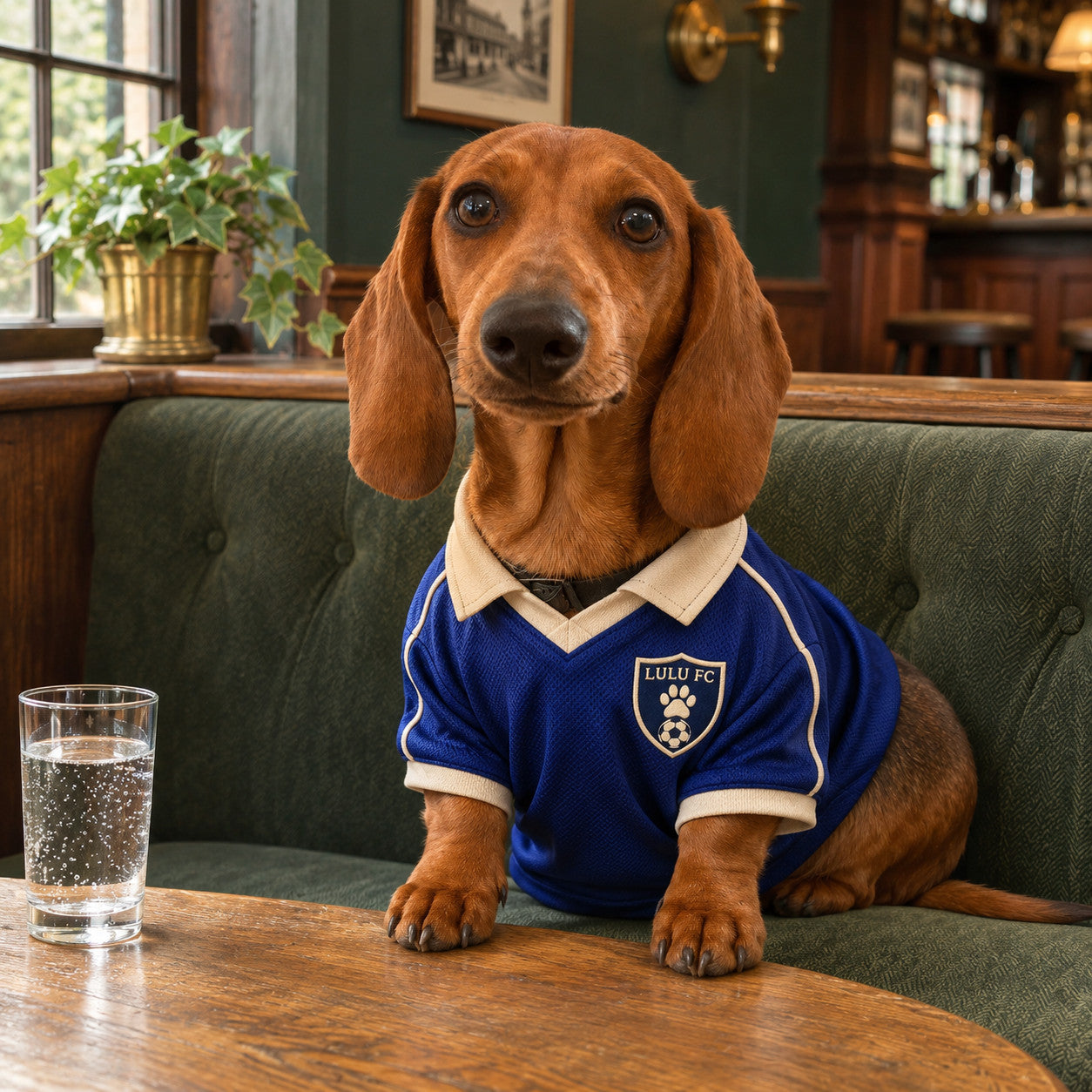
This example also shows how you can change the story after finding a portrait you like. The earlier pub picture was the starting point for the after-match version. A follow-up request changed the mood and clothing detail while asking to keep the familiar face and pose. Compare the result with the original again; a small request can still affect other features.
Make it yours: change the shirt pattern, room character or badge wording. Ask for a cosy snug, a tired post-match expression or another small detail that makes the scene yours. Keep the props restrained so the dog remains the focus.
Three more football directions
The setting and artistic style can change the whole feeling while the pet remains the subject. These additional examples explore a daylight pitch-side portrait, a more atmospheric stadium tunnel and a vintage illustrated treatment.
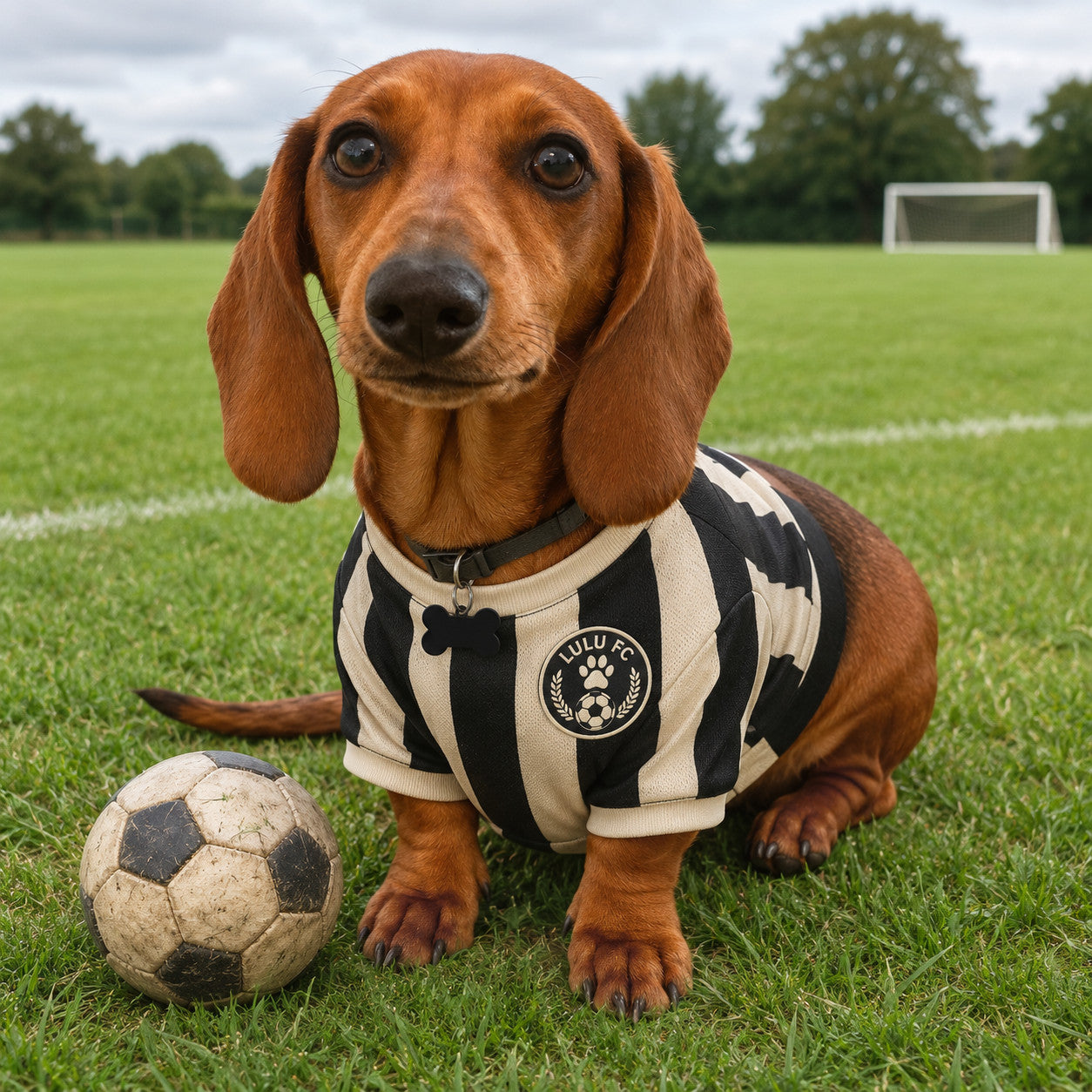
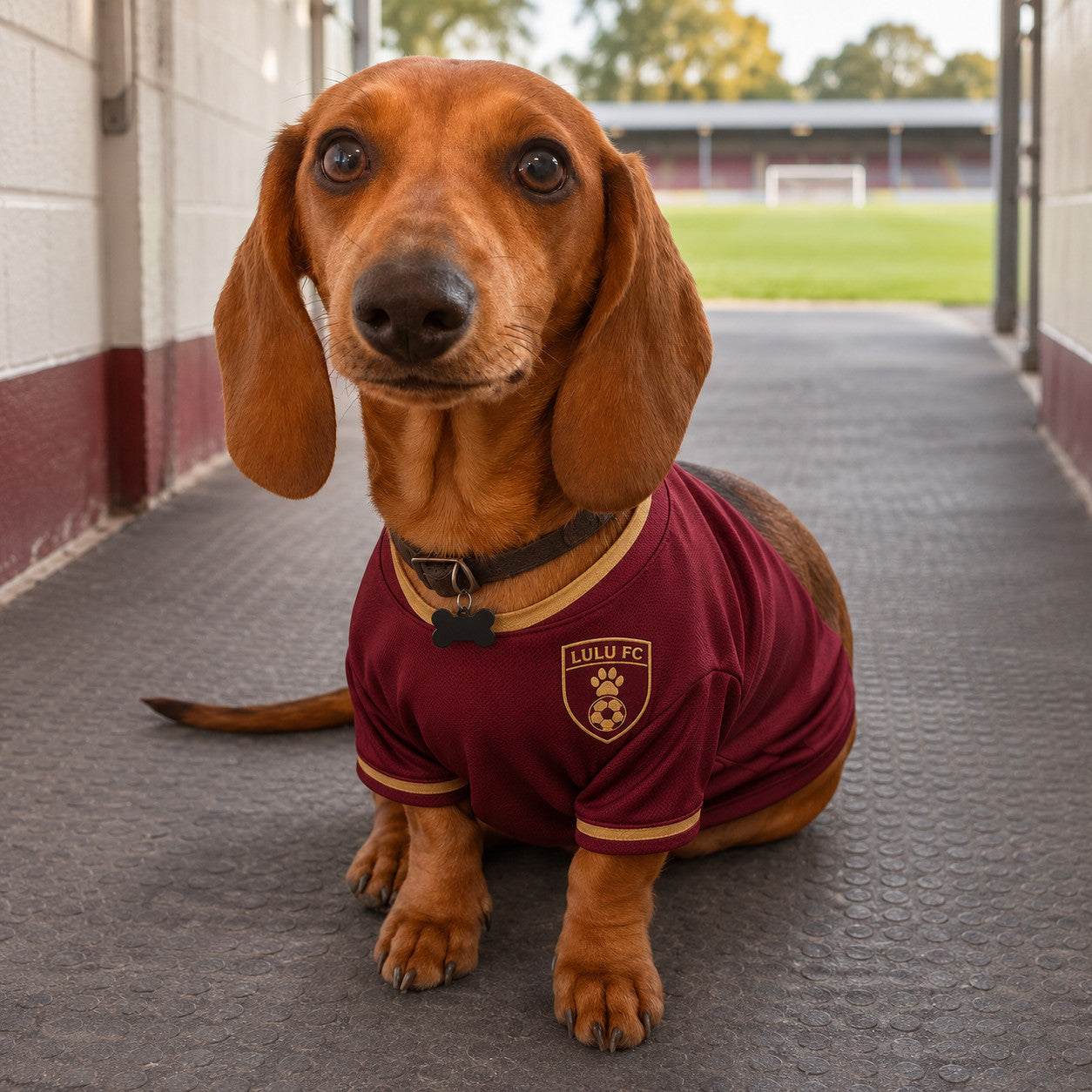
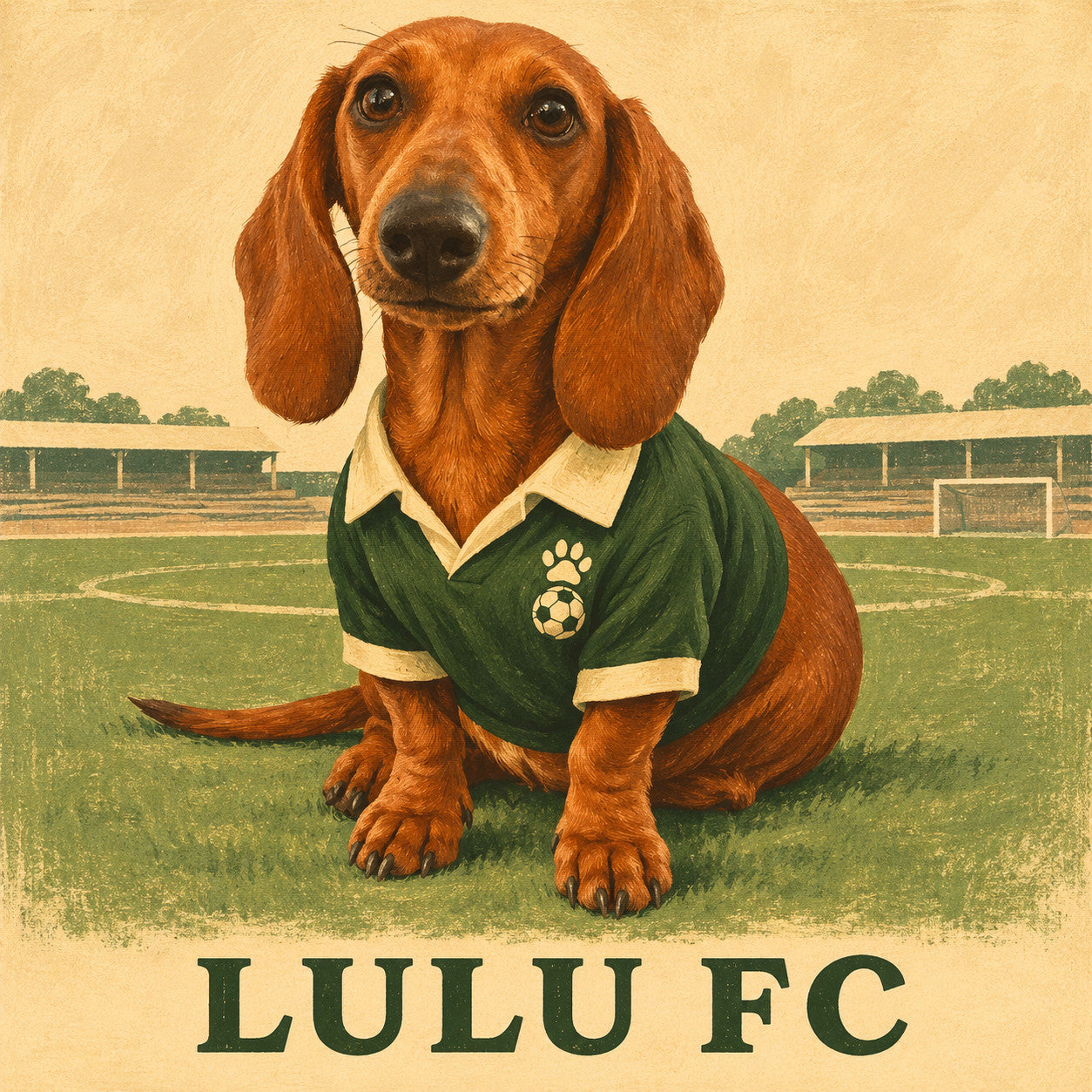
All three are AI-created examples made in ChatGPT, not physical print photographs. Their full generation briefs are included in the handoff pack.
Use them to decide what appeals to you. You can ask for a photographic, painted or graphic version of the same idea before settling on a direction.
Give them the award they have worked so hard to earn
An invented award is a good way to use a real habit. Keep the humour specific to your pet, and let their normal expression do some of the work. A dog solemnly receiving an achievement they should probably not be proud of is often funnier than an exaggerated grin.
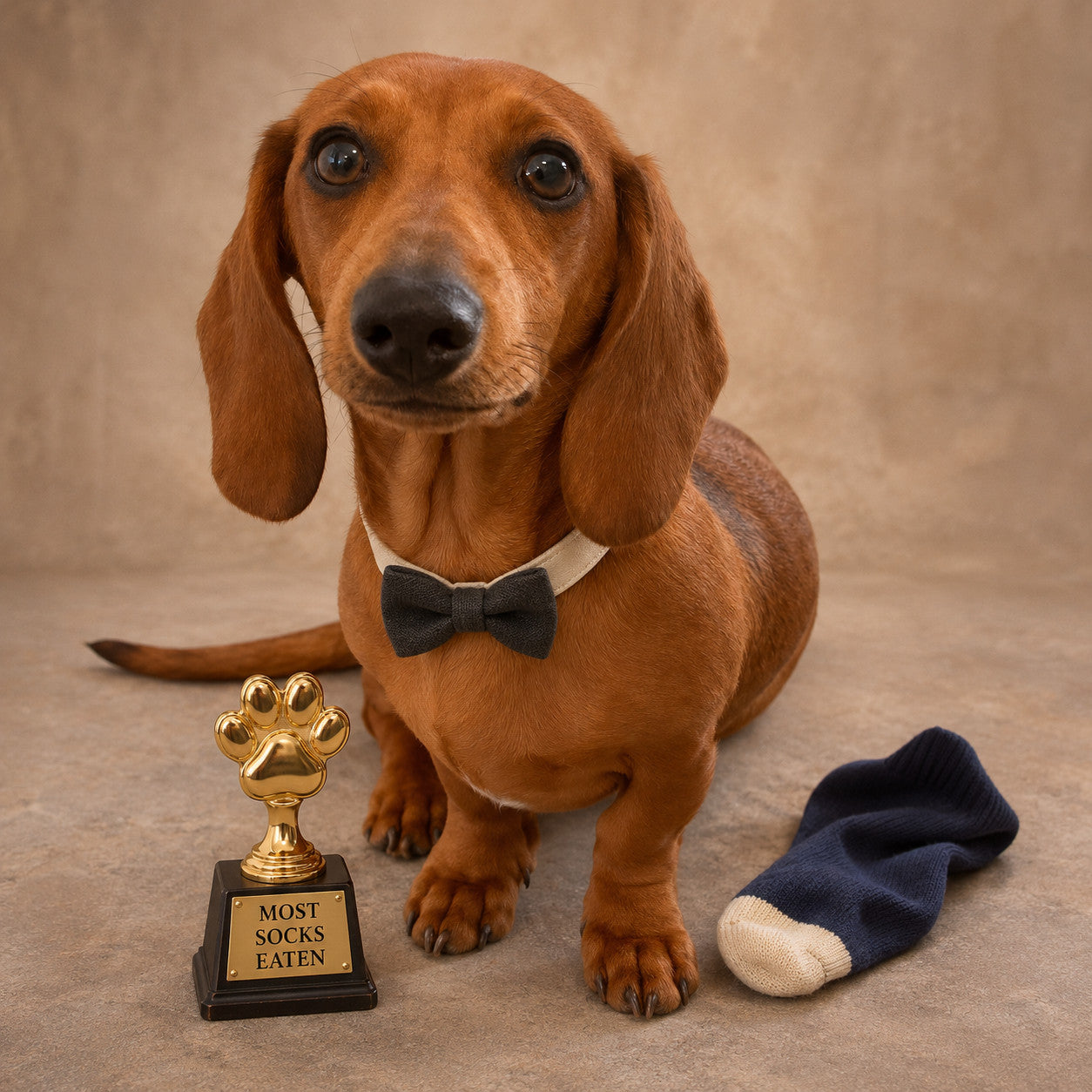
Most socks eaten
The idea is an affectionate household joke: a formal little award for a very unofficial achievement. A single odd sock beside the dog tells the story. You do not need a mountain of laundry, several trophies and a room full of distractions.
Personalise & copy the prompt
Attach your own pet photo in ChatGPT or your chosen image editor. These controls prepare text; they do not generate an image.
* Wrap choices use the worked 1-inch-depth example below. Other depths and finishes need their own allowance. Apply choices updates the text; manual edits stay until you choose to rebuild.
Make it yours: change the award title, name or colour palette. If your pet only carries socks around, “Chief Sock Inspector” might be a better fit than the title used here.
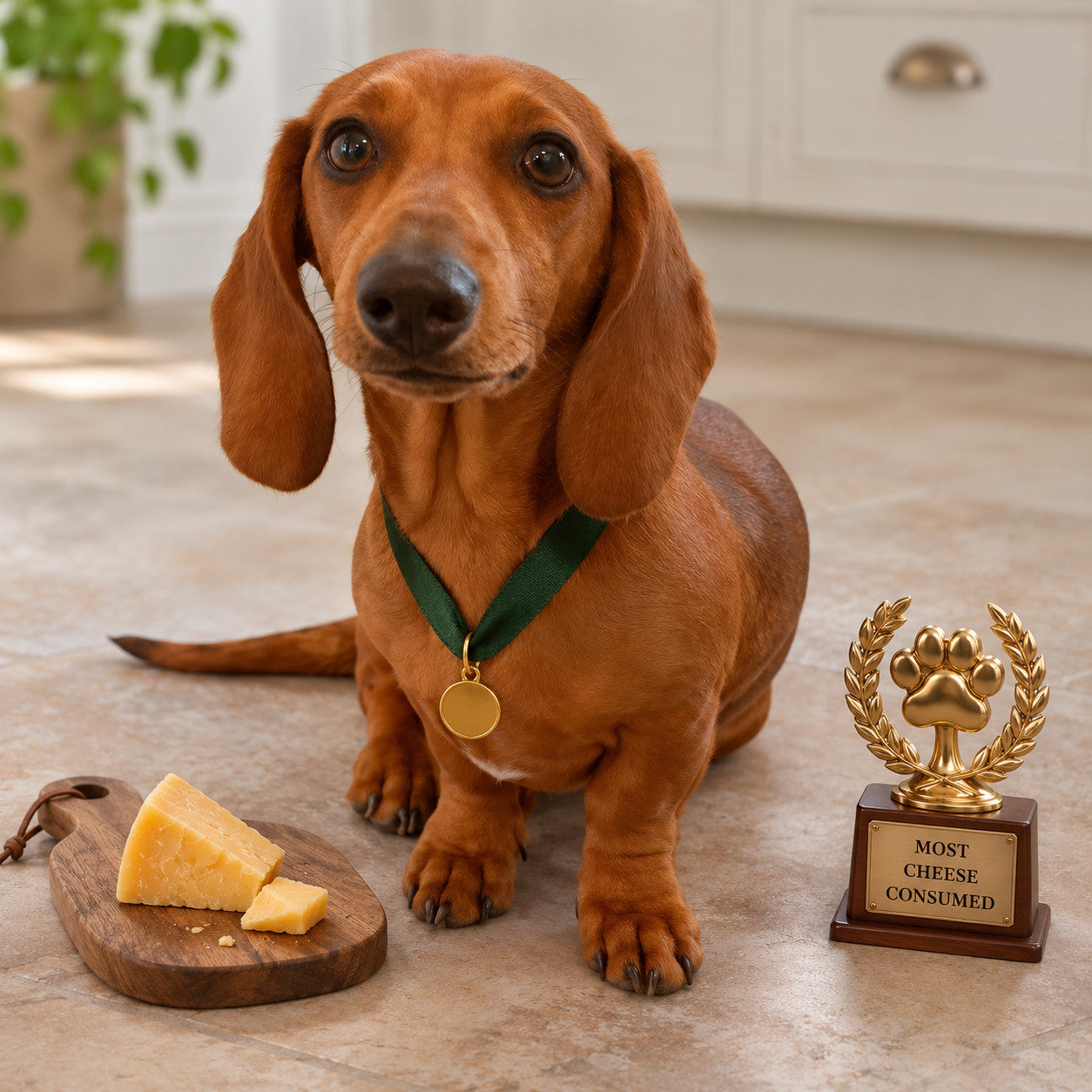
Most cheese consumed
Some pets do not need to be in the kitchen to know what is happening there. A cheese-themed award turns that familiar talent into a portrait. Keep the scene considered: a clear face, a readable award and just enough supporting detail to make the joke land.
Personalise & copy the prompt
Attach your own pet photo in ChatGPT or your chosen image editor. These controls prepare text; they do not generate an image.
* Wrap choices use the worked 1-inch-depth example below. Other depths and finishes need their own allowance. Apply choices updates the text; manual edits stay until you choose to rebuild.
Make it yours: choose a favourite family phrase or a new title. “Head of Cheese Inspection”, “Outstanding Services to Snack Supervision” and “The Cheese Radar” are suggested directions, not additional demonstrated results.
Short wording is easier to inspect than a long inscription. Put the required phrase in quotation marks and specify where it belongs. Then read every letter in the finished image. A decorative plaque can look polished while saying something you never asked for.
Ready for a swim—even when the puddle barely covers their paws
Goggles, a determined face and a suitable setting can supply the whole joke. The contrast between the animal’s preparations and the scale of the adventure gives you two different directions to try.
Poolside preparations
The pool version is a small imagined sporting portrait. Keep the pet recognisable and naturally proportioned, then let the swimming accessories and setting supply the character. You can change the colours or ask for a quieter background if the first result feels too busy.

Personalise & copy the prompt
Attach your own pet photo in ChatGPT or your chosen image editor. These controls prepare text; they do not generate an image.
* Wrap choices use the worked 1-inch-depth example below. Other depths and finishes need their own allowance. Apply choices updates the text; manual edits stay until you choose to rebuild.
Make it yours: choose a pool, lakeside or holiday setting, and a photographic or illustrated treatment. Those are choices you can explore; the displayed image demonstrates only the version shown.
Fully prepared for a very small puddle
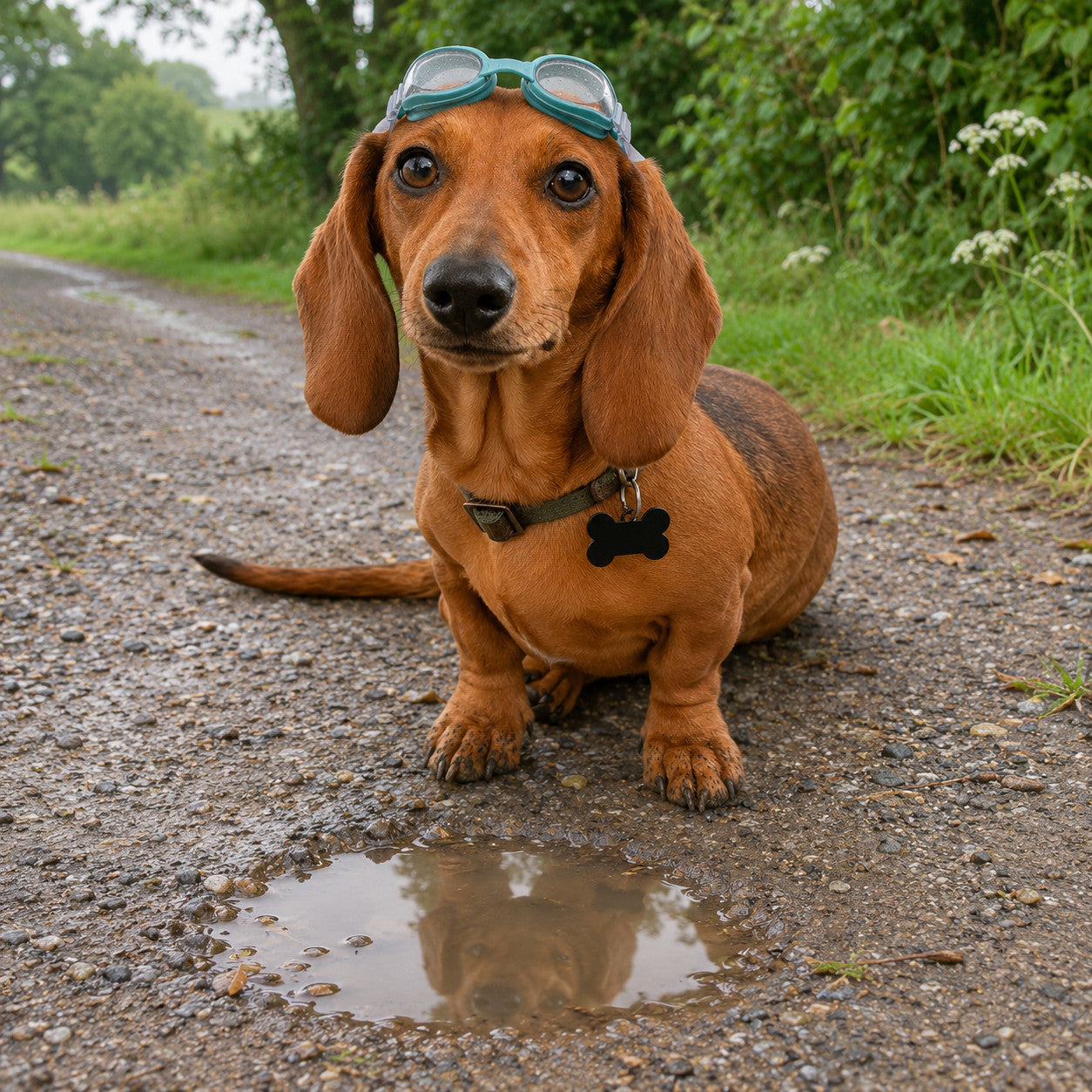
The tiny-puddle version makes the scale of the adventure the punchline. Give the dog the same seriousness you would use for a grand sporting portrait, then keep the actual water modest. Avoid packing the scene with other jokes that compete with the face.
Personalise & copy the prompt
Attach your own pet photo in ChatGPT or your chosen image editor. These controls prepare text; they do not generate an image.
* Wrap choices use the worked 1-inch-depth example below. Other depths and finishes need their own allowance. Apply choices updates the text; manual edits stay until you choose to rebuild.
Make it yours: “Puddle Champion”, “Deeply Committed to Shallow Water” and “Ready for the Big Splash” are possible titles to try. They are wording suggestions, not promises that every phrase will fit every composition.
36 ideas to make the picture feel like your pet
Start with the moment that makes you laugh: the stare when you open the fridge, the stolen warm seat, the determination to supervise a delivery. A family joke is often enough. You can turn it into a photograph, an understated painting or a more graphic illustration.
Open a group below and choose Use this idea to fill the idea builder. It will keep any prompt you have already edited until you choose Apply choices. These are suggestions to develop with your own pet, rather than 36 additional pictures we have generated or tested.
Their unofficial job6 ideas · +
Head of Cheese Inspection
The pet sits beside a modest wooden tasting board and a tiny desk plaque, looking as serious as they do whenever the fridge opens.
Chief Sofa Officer
A favourite armchair becomes an office, with one cushion slightly out of place and the pet calmly occupying the best seat.
Parcel Quality Control
The hallway supervisor sits beside one unopened cardboard parcel, ready to inspect everything that comes through the door.
Director of Naps
A sleeping pet, a little eye mask resting nearby and a very quiet bedroom give their greatest skill the respect it deserves.
Garden Supervisor
An innocent face beside one muddy trowel and an empty plant pot tells the story without covering the pet in costume.
Head of Home Security
The smallest animal in the house gets a dignified doorway portrait, with one modest badge on a fitted collar or harness.
Sport and supporters6 ideas · +
Your real football team
Use the genuine shirt reference and a quiet portrait; make the exact team and favourite season part of the gift.
Your own pet club
Create a home club with family colours, a personal name and a small original paw-and-ball crest.
Retired From Chasing Balls
An older pet enjoys a comfortable sideline seat, with one worn ball nearby and no attempt to make them perform.
Tiny Tennis Champion
A low court-side portrait, one ordinary tennis ball and a small towel can make a lovely picture of an enthusiastic ball collector.
Fair-weather Golfer
The pet shelters under a small umbrella beside the green, giving the weather the same look they give an evening walk.
Supporter of the Year
A seated portrait with a scarf laid beside the pet works well when a fitted shirt would hide distinctive chest markings.
Holidays, weather and very small adventures6 ideas · +
Puddle Training Camp
Swimming goggles above the eyes and a laughably small puddle make the pet look prepared for an expedition with very little water.
First in the Holiday Queue
A modest suitcase, one luggage tag and the expectant look of a pet who refuses to be left behind make a personal travel joke.
Beach Patrol
Use a quiet stretch of sand, a little seaweed and one bucket; keep the pet safely seated on dry ground in the imagined scene.
Reluctant Rainwalker
A properly fitted little raincoat and a dry doorstep suit the dog who thinks rain is a personal insult.
Winter Walk Inspector
A wool scarf placed naturally around the neck, a few snowy footprints and a familiar serious expression keep it simple.
Caravan Holiday Manager
The pet surveys the campsite from a low step, with a little travel bowl and the air of someone who booked the place.
Small household crimes6 ideas · +
The Missing Sock Investigation
A detective-style portrait needs only one odd sock, a small notebook nearby and the familiar innocent face.
Clean Washing Inspector
The pet sits beside a folded towel or laundry basket, clearly waiting to conduct a very thorough comfort test.
The Biscuit Enquiry
One closed biscuit tin and a single crumb suggest the entire story; the pet does not need to be shown eating anything.
Slipper Collector
A single well-worn slipper beside the pet gives the gift its meaning without burying the animal in a pile of shoes.
Professional Bed Warmer
Keep the resting pose, a rumpled duvet and that expression which says the warm spot was never yours in the first place.
Curtain Twitching Champion
A cat on a low windowsill or a dog near the window becomes the neighbourhood observer, with daylight and a quiet street beyond.
Painting, history and imagination6 ideas · +
Quiet Country Explorer
An old map on the ground, a small satchel nearby and a painted landscape suit the pet who investigates every path.
A Very Small Admiral
A restrained painted portrait, properly fitted collar detail and a distant painted sea give a grand subject a familiar little face.
Space Programme Applicant
Keep the pet seated on solid ground beside a small helmet, with a restrained imagined launch setting behind them.
Woodland Storybook Hero
A hand-painted clearing, a small path and warm natural coat colours work well for a softer nursery or family-room picture.
Vintage Travel Poster
Choose a favourite destination and simplify it into a few bold shapes behind a recognisable illustrated pet.
Library Keeper
A calm painted portrait beside a low stack of books suits the pet who insists on joining every reading session.
Gifts and family stories6 ideas · +
The Birthday Guest of Honour
One simple ribbon, a restrained little cake prop and the pet’s real expression make a birthday picture without a wall of party graphics.
Wedding-day Ring Security
A neatly fitted bow tie and one closed ring box can acknowledge the family pet without putting rings in their mouth.
Grandad’s Workshop Apprentice
Use a low safe bench, a closed toolbox and the pet waiting patiently, borrowing colours from the actual workshop.
Saturday Breakfast Supervisor
A seat beside the kitchen table, one folded newspaper and the hopeful look everyone recognises make a personal everyday scene.
The Family Band
An instrument rests beside the pet rather than being forced into their paws; use the recipient’s favourite musical colours or era.
The Family Meeting
The pet chairs a very important family meeting, naturally supported beside a low table with one closed notebook and a familiar expectant look.
YOUR PET. YOUR BRIEF.
Take an idea further
Change the setting, humour, artistic style and wording below. A serious portrait in an absurd situation can be enough; you do not need to add a joke to every object.
Build a prompt around your own idea
Attach the reference images described in this prompt. These controls prepare editable text; create the image in ChatGPT or your chosen image editor.
* Wrap choices use the worked 1-inch-depth example in the canvas section. Other depths need their actual allowance. Changing a field keeps your manual prompt edits. Choose Apply choices when you want to rebuild the text.
Choose the look as carefully as the joke
| Direction | Ask for | Useful detail to protect |
|---|---|---|
| A believable photograph | Soft daylight, real fabric, natural coat colour and a restrained setting. | Eye size, muzzle, whiskers, believable paws and contact with the floor. |
| A painted portrait | A named medium such as gouache, watercolour or oil paint, with a limited palette. | The pet’s distinctive head shape and markings beneath the brushwork. |
| A vintage sporting illustration | Period-inspired shapes, restrained texture and one short title. | A familiar face and legible lettering rather than decorative clutter. |
| A bold graphic picture | Simple colour blocks, clean silhouettes and deliberate empty space. | Ears, markings and outline that distinguish your animal. |
| A storybook scene | Gentle painted scenery, expressive natural posture and a clear main subject. | The real pet’s proportions; avoid replacing them with a generic character. |
Explain what you like about a reference: “the muted green and cream palette, simple shapes and visible brushwork”. That gives the tool a clearer direction than “make it arty”. Keep the pet photograph in the request so the chosen style has a familiar animal to work with.
Two more complete starting prompts
Here are two new briefs to try beyond the illustrated examples: a household supervisor and a painted explorer. Edit the role, place, colours or wording to suit your own animal. They are starting prompts, not additional finished examples shown on this page.
Try the household supervisor portrait
Attach the reference images described in this prompt. These controls prepare editable text; create the image in ChatGPT or your chosen image editor.
* Wrap choices use the worked 1-inch-depth example in the canvas section. Other depths need their actual allowance. Changing a field keeps your manual prompt edits. Choose Apply choices when you want to rebuild the text.
Try a painted little explorer
Attach the reference images described in this prompt. These controls prepare editable text; create the image in ChatGPT or your chosen image editor.
* Wrap choices use the worked 1-inch-depth example in the canvas section. Other depths need their actual allowance. Changing a field keeps your manual prompt edits. Choose Apply choices when you want to rebuild the text.
Two pets, or a set that belongs together
For two animals in one scene, give each a clear reference and describe their real relative sizes. A tiny terrier beside a large Labrador should not become two equally sized dogs. Label each photograph and say which markings belong to which animal. Keep some separation between their bodies so paws and tails do not merge.
Bring two pets into one picture
Attach one clear original photograph of each pet. Replace the bracketed details and describe their actual relative sizes. This is a new idea to try, not an additional demonstrated Lulu image.
* Wrap choices use the worked 1-inch-depth example in the canvas section. Other depths need their actual allowance. Changing a field keeps your manual prompt edits. Choose Apply choices when you want to rebuild the text.
A coordinated set is another lovely option: football, snacks and holidays, or one portrait for each family pet. Agree the image shape, scale, camera height, palette and amount of background before you generate the rest. Separate square pictures with the same head height often look more coherent than a mix of close-ups and full-body scenes.
Plan a matching set before generating it
This prompt asks for a plan and separate briefs first. Make and check one picture at a time; it does not create an automatic print bundle.
* Wrap choices use the worked 1-inch-depth example in the canvas section. Other depths need their actual allowance. Changing a field keeps your manual prompt edits. Choose Apply choices when you want to rebuild the text.
Make one picture first and approve its face and style. Then attach it as a style reference alongside the next pet’s original photograph, clearly explaining those roles. Ask for each picture as a separate file. A single image showing three pictures on a wall is a mock-up, not three complete printable artworks.
For cats, rabbits and other animals, change more than the name. Describe the actual ears, whiskers, paws, beak or coat, and remove dog-specific anatomy from any copied prompt. A rabbit beside an explorer’s map may suit the idea better than forcing it into the same shirt as a seated dog. The demonstrated images here remain Lulu’s dog portraits.
Fix the one thing that is bothering you
Save a version you like before making changes. Describe the specific problem, then protect the parts that work. “The muzzle is too short” gives a clearer correction than “make it more realistic”. If everything has drifted, return to the original photograph and your saved brief rather than building on an unsuitable face.
| What you notice | Useful next request | Check again |
|---|---|---|
| It looks like the breed, but not your pet. | Compare the original; name the changed muzzle, eyes, ears or markings. | The expression as well as the individual features. |
| The outfit has changed the body. | Correct the garment fit around the existing animal. | Sleeve openings, paws, leg count and shoulder shape. |
| The shirt is the wrong version. | Supply the exact kit reference and ask for the garment only to change. | Crest, collar, sponsor and absence of mixed-season details. |
| The scene is too busy. | Keep one main prop and simplify the rest of the setting. | The face is still the clear focal point. |
| The lettering is wrong. | Give the exact short phrase and its intended position. | Every letter in the actual downloaded image. |
| It looks glossy or overprocessed. | Ask for natural coat colour, restrained light and modest eye reflections. | Familiar fur and markings have not been smoothed away. |
| Important details are too near the edge. | Extend the background for the chosen front and wrap allowance. | Actual output ratio, front boundary and remaining pixels. |
The editable follow-ups below are new suggestions for those situations. Attach the image you want to edit; when checking likeness, attach the original pet photograph too and identify its role.
Bring back the familiar face
Attach the reference images described in this prompt. These controls prepare editable text; create the image in ChatGPT or your chosen image editor.
Changing a field keeps your manual prompt edits. Choose Apply choices when you want to rebuild the text.
Make the shirt fit the actual animal
Attach the reference images described in this prompt. These controls prepare editable text; create the image in ChatGPT or your chosen image editor.
Changing a field keeps your manual prompt edits. Choose Apply choices when you want to rebuild the text.
Give the pet more breathing room
Attach the reference images described in this prompt. These controls prepare editable text; create the image in ChatGPT or your chosen image editor.
Changing a field keeps your manual prompt edits. Choose Apply choices when you want to rebuild the text.
Correct an award title or short caption
Attach the reference images described in this prompt. These controls prepare editable text; create the image in ChatGPT or your chosen image editor.
Changing a field keeps your manual prompt edits. Choose Apply choices when you want to rebuild the text.
Make the finish feel more natural
Attach the reference images described in this prompt. These controls prepare editable text; create the image in ChatGPT or your chosen image editor.
Changing a field keeps your manual prompt edits. Choose Apply choices when you want to rebuild the text.
Extend the background for the canvas layout
Attach the approved artwork. Choose a wrap layout below and Apply choices. These worked allowances are for the article’s 1-inch-depth example, not an automatic specification for every canvas product.
* Wrap choices use the worked 1-inch-depth example in the canvas section. Other depths need their actual allowance. Changing a field keeps your manual prompt edits. Choose Apply choices when you want to rebuild the text.
Compare the whole result after every change. Image edits can affect details beyond the part you named or selected. If a small caption keeps failing, simplify the wording or leave a clear space to add carefully typeset text in an image editor. Check the final exported file, rather than relying on what the prompt asked for.
Check the picture before you think about the print
Put the original and the finished artwork beside each other. Check the eyes, nose, muzzle, ears, coat pattern and expression first. Would you recognise your pet without the outfit or setting?
Then check anatomy and support. Count the visible paws. Look for a sleeve becoming an extra limb, an ear disappearing into a hat, a paw melting into a table or a dog’s body floating above the floor. Inspect goggles, badges, award wording and any repeated objects too.
Download the actual image and view it at full size. A small preview can hide soft fur, strange edges and mistakes in lettering. AI can keep a pet recognisable without preserving every original feature, and instructions alone do not guarantee unchanged source pixels.
The examples on this page are AI-created artwork, not photographs of physical prints or proof that every file will suit a particular size. Choosing the best result and a sensible print size are separate decisions.
Printing your pets on canvas: keep the size considered
We have been checking more AI-created artwork in the workshop recently. Some pictures look rich and detailed on a phone but show softer fur, less depth and less convincing fine detail when enlarged. For this style of portrait, our recommendation is 16 × 20 inches or smaller, subject to the actual file and crop. That is a cautious upper guide for suitable files, not approval to print these demonstration files at the maximum. They have not been physically proof-printed for this article.
That is approximately 40.6 × 50.8 cm. It is practical guidance for the artwork in this article, not a guarantee that every file will suit that size or a limit on every product we make.
Square pictures should be treated as square pictures. Choose a square front or plan a considered rectangular version; do not assume that a square file automatically suits 16 × 20 inches. Nor does a square shape establish that it will hold enough detail for a 16 × 16 canvas. Some files need a smaller print. Check the artwork, wrap preparation and chosen size together.
Actual pixel dimensions matter. A “300 dpi” label or a large file size in megabytes does not, by itself, add genuine information. The main and alternative scene examples, including the Manchester United portrait, are 1,254 × 1,254 pixels. The extended wrap demonstration is 1,122 × 1,402 pixels. These are the measured delivered files. For example, a 1,254-pixel edge spread across 16 inches provides about 78 pixels per inch before any crop. If that same edge must cover a 20-inch overall canvas file including wrap, it provides about 63 pixels per inch. Increasing the pixel count afterwards does not establish that the original fur detail was there.
Upscaling software can sometimes improve how suitable artwork presents at a chosen size. It cannot guarantee recovery of genuine missing detail. Bigger is not automatically the better print: a considered smaller canvas with a clear face can be much more satisfying than an oversized version of a soft file.
If you are unsure, email the downloaded artwork and intended size to sales@yourimage2canvas.co.uk before ordering.
Plan the canvas front and the extra material around it
The front of a canvas and the complete artwork file are not always the same measurement. The visible face is the picture you look at on the wall. Extra canvas continues around the sides and onto the back for fixing.
That matters when your pet’s ears, a trophy, a caption or a shirt badge sits near the outside of the digital picture. A composition that fills the image neatly can lose important parts from the front when some of the image is used around the canvas.
For the worked 1-inch canvas example below, our workshop allowance is 2 inches on every edge. That allowance covers the side and rear fixing material; it does not describe a 2-inch-deep visible side. Treat this as a specific production example, rather than the allowance for every canvas depth or finish.
| Visible canvas front | Allowance on each edge | Complete artwork dimensions | Complete artwork shape |
|---|---|---|---|
| 12 × 16 inches | 2 inches | 16 × 20 inches | 4:5 |
| 16 × 20 inches | 2 inches | 20 × 24 inches | 5:6 |
| 12 × 12 inches | 2 inches | 16 × 16 inches | Square |
| 16 × 16 inches | 2 inches | 20 × 20 inches | Square |

The calculation is simple: complete width = front width + twice the allowance; do the same for the height. With 2 inches added on both sides, a 12-inch front becomes 16 inches across in the complete artwork.
Notice that a 12 × 16 front has a 3:4 shape, while its 16 × 20 complete artwork is 4:5. Asking for a 3:4 picture and then stretching it to fit a 4:5 file would distort the pet. Plan the composition for the front and extend the background around it instead.
Keep the complete pet, ears, paws, important props and any wording inside the central front area, with some breathing room inside that area too. Let background extend through the surrounding allowance. The border is useful space for a wall, grass, floor or another quiet part of the setting—not the place for a trophy title you want visible on the front.
You can tell the image editor what you are planning: “The visible canvas front will be [width × height]. The complete artwork needs [overall width × overall height], including [allowance] on every edge. Keep my pet and every important detail within the central front, with comfortable space around them; extend only the background through the surrounding allowance.” Treat this as a planning instruction, not proof that the file has been produced to those physical measurements.
Asking an AI tool for inches, a DPI value or a particular print size does not guarantee the required native pixels. Check the downloaded file’s dimensions and examine the result. If you add or extend background afterwards, compare the new version with your approved portrait again.
The main portraits are creative examples rather than ready-made canvas bleed templates. The extended pub image in the diagram demonstrates extra background, but still needs the file and creator preview checked for the actual order. Details near the outside of any digital file are not automatically protected from the canvas wrap.
Other depths and side finishes can need a different allowance or a different way of preparing the edges. The creator’s Slim 0.75-inch and Chunky 1.75-inch options should be prepared for their actual depth and finish; the 1-inch example above is a worked demonstration. Contact the workshop if you need help before ordering.
Make the artwork first. Choose your print afterwards.
Keep the original pet photograph and approved artwork as separate files. Download the actual finished image from the tool you used; a screenshot of the chat or a messaging-app preview is not the best file to send for printing.
Upload it to the YI2C print creator, choose your product and size, then inspect the whole preview. Check the actual front, crop and side treatment for that selection. Leave room around ears, heads, paws and wording inside the visible face, rather than assuming that everything inside the outer digital image will remain on the front.
Choose canvas for a stretched, textured finish or a poster for smooth matte paper. The creator shows the available options and current price for your selection. See the current 3-for-2 offer and conditions if you are making several qualifying canvas or poster prints.
Creating the image happens separately in ChatGPT or your chosen editor. YI2C prints the finished file you supply; this guide does not add automatic AI generation to the print builder or include a separate design service in your print order.
You can try an idea, change your mind, improve the result and decide whether you love it before choosing a print. That is the point: your pet’s personality supplies the idea, and you get to shape the picture.
A few useful questions
Do I have to use ChatGPT?
No. It is where we created these examples, so it is the tool we favour for explaining this particular process. You can adapt the ideas for another image editor that supports reference photographs, such as Adobe Firefly or Google Gemini. Features, account requirements and results vary.
Are the prompts free to use?
Yes. Copy and personalise the prompts in this guide. Image-generation tools set their own free allowances, paid plans and access requirements, which can change; we do not promise unlimited free generation.
Can I use a cat or another animal?
You can adapt the idea. Replace dog-specific wording with your animal’s actual features and proportions. The examples here use a dog and do not demonstrate every species or pose.
Can I make an award about anything?
You can develop your own affectionate joke: snack supervision, collecting slippers or being first onto the clean washing. Keep the wording short, make the pet the focus and inspect the finished text. The suggested titles in this article are ideas to try, not additional tested results.
Will AI keep my pet exactly the same?
Exact preservation is not guaranteed. Use a clear original, explain which features matter and compare the result with that photograph. Reject changes that make the pet feel unfamiliar.
Can I print the result much larger?
Our recommendation for these portraits remains 16 × 20 inches or smaller, with an appropriate shape and a file check. Contact us if you have another size in mind. A larger canvas being available does not mean the image will hold enough detail for it.
Can I use my actual football team rather than an invented one?
Yes, you can ask for the real team shirt. The Manchester United example above shows the direction. Name the club and use a clear shirt reference for the particular kit you want; check the generated crest, collar and lettering afterwards. The fictional dog clubs remain another creative option.
What if I only have a head-and-chest photograph?
Choose a closer portrait that suits it, perhaps a shirt collar and badge, a quiet painted head study or a pub portrait with the chest visible. A full-body costume asks the tool to invent much more. If the actual body proportions or markings matter, add a clear reference that shows them.
Does my pet need to wear the outfit for the photograph?
No. Lulu’s source photograph has no football shirt. The clothing and imagined settings were created in ChatGPT. An ordinary clear photo is the starting point; you do not need to dress the pet or recreate the scene to try the brief.
Can I add a name, date or family joke?
Yes. Keep it short, spell it exactly in the prompt and say where it belongs. A plaque, shirt number or small title can work better than a paragraph of text. Leave breathing room inside the canvas front and check every character in the finished file. For precise typography, you can add the final wording separately in an image editor.
Can I change the background without changing the pet?
You can ask for that edit and name the features to preserve, but exact unchanged pixels are not guaranteed. Save the approved version and compare eyes, ears, muzzle, markings and paws after the background changes. If exact preservation is essential, a conventional cut-out and background composite offers a more controlled route than asking the image model to redraw the whole picture.
Can I make a pair from photographs taken in different places?
You can try a shared treatment. Use one reference for each pet and request the same image shape, camera height, light and pet scale. For a single scene, describe their actual relative sizes. For separate prints, approve one first and carry its visual treatment into the next while retaining each animal’s own identity reference.
Will changing the DPI setting make it suitable for a bigger canvas?
Changing the resolution label alone does not create more picture detail. Check the actual pixel dimensions, the detail in the face and fur, and how much of the file is needed for the front and wrap. Keep our 16 × 20-inch-or-smaller recommendation conditional on the file; some results need to be much smaller.
Which image should I upload for printing?
Upload the downloaded finished artwork you have checked and approved. Keep the original pet photo and earlier versions for reference. Do not upload a chat screenshot, a collage of several proposed pictures, a picture of the artwork hanging in a room or the labelled canvas teaching diagram.
Will the buttons in this guide generate the picture?
No. They help you prepare, edit and copy the wording. Paste it into ChatGPT or another suitable image editor and attach the references described. Image creation happens there; the YI2C creator is where you upload your chosen finished file for printing.
More ways to use a favourite pet photograph
Explore AI pet portrait ideas for studio and painted treatments, or pet alter egos for more imaginative characters and settings. The AI artwork guides bring together further examples and practical help.
Start with the pet you know. Bring in the little habits, colours and jokes that make the idea yours. Then choose a print that suits the picture you have made.
Help behind the examples
We checked the official guidance for images in ChatGPT, reference images and iterative prompting, editing uploaded images in Adobe Firefly and image editing in Gemini. The examples shown here were created in ChatGPT; the other tools have not been tested against this set. Guidance checked 2 November 2026.