

Autumn photography tips: take pictures worth printing
Good light. A clear subject. A photograph you will want to keep seeing.
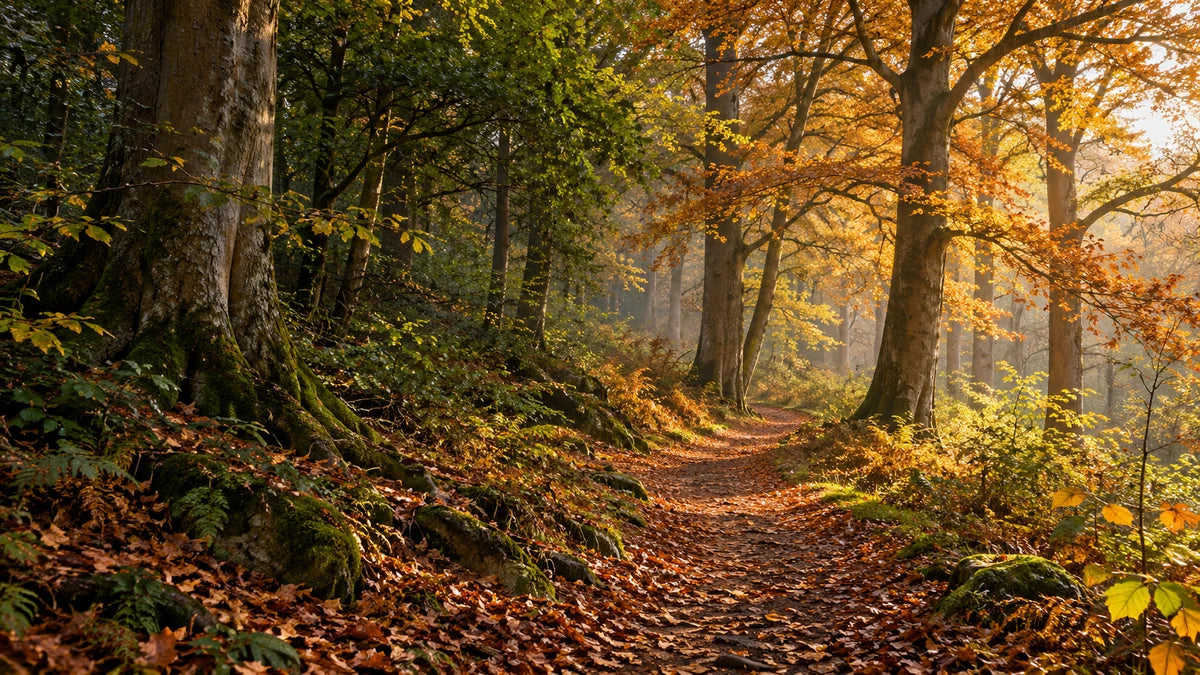
A winding path and side light give this woodland scene a clear subject. All four autumn images in this article are AI illustrations created to explain the ideas; they are not photographs of a named place or examples of camera settings.
Autumn gives you plenty to photograph: light through a tree canopy, a quiet reflection, the texture of one fallen leaf or somebody you love walking along a familiar path. The strongest picture usually has a clear subject and good light, rather than simply the most orange leaves.
You can make photographs worth printing with a phone or a camera. Start by looking carefully, keep the original files, and leave yourself room to choose the finished crop. These autumn photography tips explain what to try and how to judge the result before it becomes a poster or canvas.
We're a family printing business in West Yorkshire, making prints since 2007. Our part is turning your photograph into a finished object. A little care when you take the picture gives us a much better starting point.
Choose the light that suits the picture
Low sun for warmth and shape
Low sunlight near the beginning or end of the day can pick out trunks, paths and the edges of leaves. Look at the direction of the light: side lighting reveals texture, while light coming through a leaf makes its colour glow.
Move a few steps before taking the photograph. A small change of position can hide a bright patch of sky behind a trunk or put a pool of light where you want the eye to settle. You do not need the sun itself in the frame for a warm, autumnal picture.
Backlighting can produce a bright background and a dark subject. Check the result rather than assuming the camera has balanced both. If important sky or leaf detail has turned to blank white, reduce the exposure a little or try a different angle. Do not darken the whole photograph so far that the subject disappears.
For a print, look for detail in the part that carries the picture. Bright leaves without visible texture or a portrait with an unreadable face may lose their point when enlarged. A dramatic overall glow is only part of the decision.
Overcast days for colour and detail
A grey day can be ideal for woodland, portraits and close details. Softer light reduces the harsh bright patches and deep shadows that can make a sunlit wood difficult to photograph. Wet bark and leaves can provide plenty of interest without a blue sky.
If the sky is a large, empty pale area, compose below it. Let the trees fill the frame, move closer to a subject or use the path to lead into the picture. Weather and leaf colour vary, so look at the conditions in front of you rather than waiting for one fixed “best” date.
Get a sharper autumn photo on your phone
Wipe the camera lens with a clean, suitable cloth. A fingerprint can soften the whole picture and make bright areas look hazy. Use the main camera where practical and move to a better position instead of relying on a large digital zoom.
Tap the important subject to set focus where your phone allows it. For a portrait, that will usually be a face; for a close leaf, choose the detail you want sharp. Adjust exposure using the available controls if the preview looks too bright or dark. The controls differ between phones, so check your camera's own guide.
Hold the phone steadily with both hands and avoid jabbing at the shutter. Take a few frames and inspect them: one may catch a still moment between gusts, while another has motion blur. For people or pets, take several photographs because expressions change as well as movement.
In low light, a longer automatic exposure can blur a moving child or branch. A steady phone helps with your movement, but it does not stop the subject moving. Find a brighter position or wait for a pause. Check fine detail on the actual photograph, not just the small camera preview.
Camera settings: useful starting points, not fixed rules
The right settings depend on the light, lens, distance, subject movement and the result you want. Use these as a starting point, then look at the shutter speed, focus and photograph. They are not the recorded settings of the illustrated examples in this guide.
| Subject | Try as a starting point | What to check |
|---|---|---|
| A still woodland or landscape | Aperture priority around f/5.6–f/8, with ISO 100–400 if the light allows | Enough depth of field for the important subjects, and a shutter speed you can hold steadily |
| A child or dog moving along a path | A faster shutter, perhaps 1/500–1/1000 second, with continuous autofocus if available | The face or eyes, subject movement and whether ISO needs to rise |
| A close leaf or texture | Focus precisely on the chosen detail; try a moderate aperture and adjust your position | A narrow area may be sharp even when the background looks beautifully soft |
For a wide handheld scene, 1/125–1/250 second can be a useful initial range, but it is not a guarantee. Longer lenses, wind, camera shake or moving subjects may need a faster shutter. Take a test frame and enlarge the important detail.
Let ISO rise when needed to obtain a usable shutter speed. A little noise can be a better compromise than a blurred face. Auto ISO can help if your camera supports it, but check what the camera is choosing. Very small apertures are not automatically sharper; use enough depth of field for the picture rather than selecting the highest f-number every time.
Wind, mist and a steady camera
Branches and leaves may be moving even when the scene feels quiet. A tripod steadies the camera but does not freeze them. Use a faster shutter for crisp moving leaves, or deliberately allow movement when that suits the picture. Check that any blur is where you intended it.
For a still scene in dim light, a tripod or firm support can let you use a longer exposure. A timer or remote release can reduce the movement from pressing the shutter. Stabilisation and tripod settings vary between cameras and lenses, so follow the relevant manufacturer's guidance.
Mist can simplify a busy background by letting distant trees fade away. Give the photograph something definite to hold onto: a near trunk, a person or a path that leads into the distance. If autofocus struggles with low contrast, select a clearer edge or use manual focus where available.
Keep checking the lens when conditions are damp or temperatures change. Water or condensation can create softness that looks atmospheric on a small screen but obscures the detail you wanted. Put the equipment away or use suitable protection if conditions are beyond its weather protection.
Build the composition around one main idea
Before pressing the shutter, ask what you want somebody to notice first. It might be a bend in a path, a single yellow tree or a face. Make that choice clear with position, light, contrast and the space around it.
A path, fence or line of trunks can lead the eye into the frame. Try moving to the side or lowering the camera so that line begins naturally near the foreground. It does not have to sit in the centre. A central path can be effective too when its balance suits the scene.
Check the edges for distractions: a bright bin, half a sign, a branch cutting through a face or a strip of empty sky. Often, taking one step is a better solution than planning to remove the distraction later. Keep the important subject comfortably away from the edge if you may crop for a print.
Look at a small view too. On the wall, people first see the overall shapes and focal point. If the photograph only makes sense when you zoom into one tiny leaf, consider a closer composition or a smaller print viewed nearby.
Take a wider frame and a closer version. Try portrait and landscape when the subject allows it. A tall tree might suit a vertical print; a group of trees or a lake may work across a wider wall. Give yourself choices while keeping the subject deliberate in each photograph.
Use reflections to simplify an autumn scene
A still pond or lake can repeat the tree shapes and colours without needing a complicated subject. Choose one clear arrangement rather than including every bright tree along the bank.
For a balanced reflection, try a level horizon near the centre and compare it with a version that favours the water or the trees. Check the verticals and the edge of the bank. Move your viewpoint so foreground reeds or branches frame the scene rather than cutting across its most interesting part.
Wait briefly and watch the surface. A passing ripple may break the reflection, while a calmer moment gives a more recognisable shape. Neither is automatically better; choose the effect that supports the picture. Keep the camera and yourself in a secure position on the path or bank, rather than leaning out to obtain the last inch of reflection.
Photograph a single leaf, not just the whole wood
Look for veins, curled edges, drops of water and contrasts between a leaf and bark. A simple subject can make a strong print when the texture and light are clear. Move closer where your camera can still focus; if it cannot, back away and try again.
For a single flat leaf, keeping the camera roughly parallel to it can help more of its surface fall within the sharp area. A very close view has little depth of field, so check which vein, edge or drop is actually in focus. On a phone, watch whether it changes lenses or modes as you move closer.
A quieter background makes a small subject easier to read. Change your angle or the distance between the leaf and the background where possible. Avoid relying on extreme blur to rescue clutter. If you use a phone's artificial depth effect, inspect the outline carefully for missing or oddly softened edges.
Include people and pets without losing the scene
An autumn walk can become a family photograph rather than simply a picture of trees. Choose the background first, then find a position where the person or dog has space around them. You do not need to make everyone stand against a trunk or throw leaves for every picture.
Soft open light can keep faces easier to expose than bright sun broken by branches. Watch for patches of sunlight across eyes and cheeks. With a backlit subject, check the face carefully and consider moving to a less contrasty spot rather than forcing an extreme edit later.
Focus on the face or eyes, take several frames and allow for movement. Leave room around heads, hands, feet and a dog's ears. A portrait mode or very wide aperture can make a background attractive, but it can also leave part of a group out of focus. Check every important face, particularly when people stand in different rows.
Keep the feeling of the walk. A child pausing to look at a leaf or a dog waiting on a path can give the picture a reason to exist beyond the seasonal colour.
Edit the colour without turning everything orange
Keep the original and edit a copy. Start with the horizon and crop, then adjust brightness and white balance before increasing colour. Autumn includes muted browns, green foliage, cool shade and pale sky as well as strong reds and golds.
If a face, grey path or pale tree trunk has become orange, the overall warmth may have gone too far. Adjust gently and compare with the original. White balance is a choice about the light and mood, not a requirement to remove every warm tone.
Use HDR and strong contrast or clarity adjustments carefully. Inspect fine branches against the sky for bright outlines, and shadows for heavy noise or unnatural texture. An edit that looks dramatic on a phone does not necessarily make a convincing large print.
Keep the file that contains the detail
Use the camera's full-resolution, good-quality capture settings. RAW gives you more flexibility if you are comfortable processing it; a well-exposed, high-quality JPEG can be a perfectly useful starting point. You do not need to begin a new RAW workflow just to take one autumn photograph.
Keep the original capture and your edited master. Export a full-size, high-quality finished image for printing rather than a screenshot, social-media download or small messaging copy. If transferring between devices, download the actual file and check that it has not been reduced. Our WhatsApp photo guide explains the original-file question.
There is no single minimum file size in MB that makes every autumn photograph suitable for every canvas. Check sharpness, surviving pixels and the crop. Our photo quality guide shows what to inspect, and our image-size guide relates pixels to the print dimensions.
Choose the crop and finish for the photograph
Try the intended print shape before ordering. A broad reflection may lose its balance in a square, while a tall leaf detail can suit a portrait rectangle. Keep your original uncropped so you can try another arrangement later.
For canvas, look at what stays on the front and what appears on the sides. Do not put an important face, tree or fine detail right on the boundary. The canvas sides guide explains edge treatments, including why mirror sides do not remove the need to check the front crop.
Compare photo posters for a smooth paper finish with canvas prints for texture and depth. If your poster will go into a frame or mount, allow for the part its lip may cover.
One picture or a set of three?
A wide woodland view, a reflection and one close leaf detail can tell the story of the same season without repeating the same composition. Look for a shared palette or mood, then give each photograph a different job: the place, the atmosphere and the small detail.
Try the intended shapes together before ordering. Keep their visual weight balanced; three matching print sizes do not require three identical subjects. For a single large canvas, choose the photograph that holds attention at a distance and still rewards a closer look.
For local inspiration, our Pontefract photography and canvas guide connects choosing a photograph with making a print here in West Yorkshire. When you have a picture you want to keep, upload the finished image and check the size, crop and finish. If you are unsure about the file, ask our team before ordering.
Autumn photography questions
What is the best time of day for autumn photography?
Low sunlight near the beginning or end of daylight can give warm colour, long shadows and light through leaves. That is useful for some pictures, but it is not the only good light. Overcast conditions can suit woodland detail and faces, while mist can simplify a scene. Look at the subject and the direction of light rather than relying on one fixed time or date.
Can I take an autumn photograph good enough for canvas on my phone?
Yes, provided the particular file has enough detail for your chosen size and crop. Use the original, clean the lens, focus carefully and check for movement blur. A phone model or a large file size alone does not settle suitability. Inspect faces, leaf detail or the subject that matters, then choose a sensible print size. Ask us if you are uncertain about the actual photograph.
Why are my woodland photos blurry even on a tripod?
The tripod may hold the camera still while leaves, branches or people move during the exposure. Focus can also miss the intended subject. Check which kind of blur you have before changing settings. A faster shutter can help with subject movement; a timer or remote can reduce movement from pressing the shutter. Review the camera and lens guidance for stabilisation settings when supported on a tripod.
Which aperture should I use for autumn landscapes?
A moderate aperture such as f/5.6–f/8 can be a practical starting point, but depth of field depends on the lens, camera, focus distance and scene. Close foreground subjects may need more care than distant trees. Check the important detail and the resulting shutter speed. Choosing the smallest opening automatically can create a slow exposure without giving you the improvement you expected.
How do I get stronger autumn colours without over-editing?
Begin with suitable light and a clear subject. Check exposure and white balance before reaching for saturation. Make restrained adjustments and compare with the original, watching skin, paths and pale objects for unwanted colour shifts. Look for noise, halos and lost detail after strong processing. Rich colour is useful when it supports the photograph; it is less convincing when every surface becomes the same orange.
Should I shoot RAW or JPEG if I want a print?
RAW can give more processing flexibility, but it needs a suitable editing and export workflow. A well-exposed, full-resolution, high-quality JPEG can also produce a worthwhile print. Keep whichever original you capture and prepare a finished image for upload. Changing the file extension or converting a small JPEG to another format does not recover missing detail. Choose the workflow you can use carefully.
What size should I print my autumn photograph?
Consider the wall, the subject, the file and the intended crop together. A landscape with tiny distant detail needs different judgment from a simple leaf study or a close portrait. Inspect the pixels that remain after cropping, not only the uncropped dimensions. Try the shape in the creator and use our image-size guide; there is no universal MB number that approves every photograph for a large canvas.
Found this guide useful?
Add Your Image 2 Canvas as a preferred source on Google.

3 for 2 · Mix and match
Canvas prints.
Quality you can see.
Printed and finished by our family team in West Yorkshire.
From £14.99, including free standard UK delivery.
Create your canvasMix qualifying physical Canvas and Poster prints. Cheapest qualifying base print free; upgrades and extras remain payable. Downloads excluded. Delivery exclusions apply.